 By carl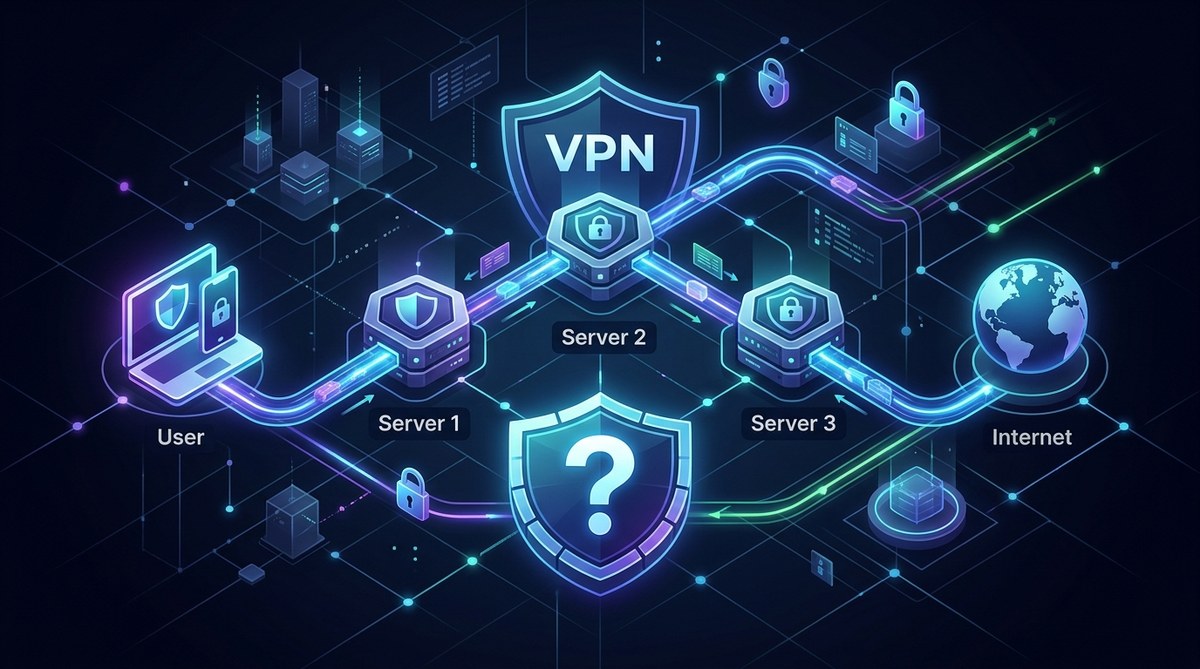
Your VPN provider probably markets multi-hop as an unbreakable shield. Two servers. Double encryption. Total anonymity. It sounds like the ultimate upgrade for anyone serious about privacy. But if you have spent any time tweaking VPN settings or reading server logs, you know that security features rarely deliver exactly what the marketing promises. Multi-hop can be a powerful tool, but it is not a privacy panacea. In some situations, it adds real protection against sophisticated adversaries. In others, it just slows your connection while giving you a false sense of safety. The difference depends on your threat model, your provider, and how you use it.
Multi-hop VPN security is not about stronger encryption. It is about splitting trust across two servers so that no single node can link your real IP to your destination. This helps against a compromised VPN server, a hostile ISP, or targeted surveillance. But it does not help if your provider logs everything, if you leak DNS queries, or if browser fingerprinting gives you away. Use multi-hop only when your threat model justifies the speed loss.
How Multi-Hop Actually Changes Your Risk Profile
A standard VPN connection sends your traffic through one encrypted tunnel to a single server. That server decrypts the data and forwards it to the destination. The server operator sees your real IP and the site you visit. If they log that combination, your privacy is gone.
Multi-hop routes your traffic through two servers. Your device encrypts once for the entry server, then that server re-encrypts for the exit server. The entry server knows your real IP but not your destination. The exit server knows your destination but not your real IP. An attacker would need to compromise both servers simultaneously to link you to your activity.
| Threat Scenario | Standard VPN | Multi-Hop VPN | What Actually Changes |
|---|---|---|---|
| Compromised exit server | Your real IP is exposed | Only the entry IP is visible | Attacker sees the entry server, not you |
| ISP monitoring your traffic | ISP sees encrypted tunnel to one IP | ISP sees encrypted tunnel to entry server | More hops do not hide that you use a VPN |
| Targeted court order to VPN provider | One provider has both IP and destination | Provider must hand over logs from two servers | Only helps if provider uses separate jurisdictions |
| Browser fingerprinting | Unaffected by VPN | Unaffected by multi-hop | Multi-hop does not change browser leaks |
| DNS leaks | Exposes your ISP and destination | Still exposes your ISP and destination | DNS leaks bypass the entire chain |
The core benefit is trust distribution. If you do not fully trust your VPN provider or you worry about server compromise, multi-hop reduces the damage a single failure can cause. But it does not make the encryption itself stronger. AES-256 is AES-256 whether it runs once or twice.
When Adding a Second Hop Actually Protects You
There are specific situations where multi-hop shifts the odds in your favor. These are worth understanding because they define whether the feature matters for you.
-
You are using a provider you do not fully trust. If you signed up with a service based in a surveillance-heavy country or one with a opaque logging policy, adding a second server in a friendlier jurisdiction creates a separation of evidence. The entry server cannot see where you go, and the exit server cannot see who you are. This is the strongest argument for multi-hop. Pair it with a clear understanding of Understanding VPN Logging Policies: What Your Provider Really Knows to avoid surprises.
-
You face a targeted adversary with resources. Journalists, activists, or whistleblowers operating under state-level surveillance can benefit from the extra hop. A motivated attacker might compromise a single VPN server. Making them compromise two servers across different legal jurisdictions raises the cost of surveillance. This is not about hiding from your ISP. It is about hiding from an organization that can subpoena server logs.
-
You are connecting from a restricted network that inspects traffic. Some corporate or government networks monitor outbound connections. A multi-hop connection can make it harder for the network to determine which sites you visit, because the exit server sits outside the controlled environment. The network still sees the entry server, but the final destination stays hidden.
-
You want to separate your online identities. If you manage multiple accounts or personas, routing different activities through different exit nodes can prevent correlation. Multi-hop adds another layer of separation between your home IP and the public-facing identity.
Where Multi-Hop Fails and Creates False Confidence
Many users enable multi-hop expecting a bulletproof setup. The reality is more mundane. The following weaknesses apply whether you use one hop or three.
-
Browser fingerprinting does not care about your VPN. Canvas fingerprinting, WebGL, screen resolution, installed fonts, and timezone settings can identify your device with high accuracy regardless of your IP address. Multi-hop does nothing to stop this. You need a privacy-focused browser and strict fingerprinting defenses to complement your VPN.
-
DNS leaks break the entire chain. If your device sends DNS queries outside the VPN tunnel, both the entry and exit servers become irrelevant. Your ISP or any network observer can see exactly which domains you visit. Multi-hop cannot fix a leaky configuration. Always test for leaks before relying on any VPN setup. Our guide on How to Test Your VPN for DNS, IP, and WebRTC Leaks in 5 Minutes shows you the exact steps.
-
Logging at either server compromises the chain. If your provider logs the entry server connection alongside your real IP, and separately logs the exit server connection alongside your destination, they can correlate the two sets of logs. Multi-hop only helps if the provider truly segregates logging or operates servers in jurisdictions that prevent data sharing.
-
The speed penalty is real and often unnecessary. Routing traffic through two servers doubles latency and often reduces throughput by 40 to 60 percent. If you do not face a specific threat that requires trust distribution, you are just making your browsing slower for no security gain.
Expert advice: “Multi-hop is a surgical tool, not a default setting. Use it when your threat model includes a compromised VPN server or a legal demand for logs. For everyday browsing, a well-configured single-hop VPN with a kill switch and leak protection provides 95 percent of the benefit with none of the speed penalty.” Privacy engineer, 2026
How to Test Whether Your Multi-Hop Setup Works
You cannot trust a feature just because the toggle is green. Verify that your multi-hop connection actually separates your identity from your activity. Follow these steps.
-
Connect to your standard single-hop VPN server. Visit a site like whatismyipaddress.com and note your public IP. Also check your DNS server address using a leak test tool. Record both values.
-
Enable the multi-hop feature and connect to your chosen entry and exit server pair. Your VPN client should show two locations. If it only shows one, the multi-hop may not be active.
-
Run the same leak tests again. Your public IP should now show the exit server location, not the entry server. Your DNS server should also resolve through the exit node. If you see your real ISP DNS or your entry server IP, something is wrong.
-
Check for WebRTC leaks. WebRTC can reveal your real IP even when the VPN tunnel is active. Use a dedicated WebRTC leak test page. If your real local IP appears, disable WebRTC in your browser or use an extension that blocks it.
-
Perform a traceroute to a test domain. Run
traceroute google.com(macOS/Linux) ortracert google.com(Windows). On a working multi-hop connection, the first hop should be your entry server, and subsequent hops should route through the exit server before reaching the destination. If you see your home router or ISP gateway, the tunnel is broken. -
Repeat the test after reconnecting. Some VPN clients fail to enforce multi-hop after a reconnect. Verify that the feature holds across connection drops. A VPN Kill Switch Explained: Why You Need One and How to Enable It adds a safety net if the tunnel fails.
| Test | Single-Hop Result | Multi-Hop Result | What to Look For |
|---|---|---|---|
| Public IP check | Shows exit server IP | Shows exit server IP | Same in both cases, but the path differs |
| DNS leak test | No ISP DNS visible | No ISP DNS visible | Leaks break both setups equally |
| Traceroute | One VPN hop after your gateway | Two VPN hops | If you see only one hop, multi-hop is off |
| WebRTC test | No real IP exposed | No real IP exposed | Browser leaks bypass both |
| Speed test | Moderate loss | Higher loss | Expect 40-60% slower than single-hop |
Multi-Hop Versus Tor: Which One Fits Your Threat Model?
This is a common comparison because both systems route traffic through multiple nodes. But they serve different purposes and protect against different threats.
Tor uses three volunteer-operated relays with layered encryption. It is designed to protect against global surveillance and to provide anonymity for users who cannot trust any single relay operator. The trade-off is speed. Tor is significantly slower than even a multi-hop VPN.
Multi-hop VPN uses two servers operated by the same provider (or sometimes two different providers). The provider controls both nodes. This makes multi-hop faster than Tor but less anonymous against a powerful adversary who can compel the provider to reveal logs.
Choose multi-hop VPN when you need speed and trust your provider reasonably well. Choose Tor when you need maximum anonymity and can tolerate slow speeds. You can also combine both with a Tor-over-VPN setup, but that adds complexity and can create new fingerprinting risks. Our guide on Should You Use Tor, a VPN, or Both for Maximum Privacy? walks through the trade-offs for each scenario.
Common Mistakes That Undermine Multi-Hop Security
Even experienced users make errors that gut the protection multi-hop provides. Avoid these pitfalls.
-
Using the same provider for both hops. If your VPN provider logs everything, two hops through their infrastructure still leaves a complete record. The separation only works if the two servers operate independently or in different legal jurisdictions.
-
Failing to enable a kill switch. If your VPN drops and reconnects to a single hop without your knowledge, you lose the multi-hop protection. A kill switch blocks all traffic until the full chain is restored.
-
Ignoring IPv6 traffic. Many VPNs handle IPv4 but leak IPv6 requests outside the tunnel. If your device uses IPv6, your real IP can bypass both hops entirely. Disable IPv6 or confirm your VPN supports IPv6 leak protection.
-
Using multi-hop as a substitute for operational security. No routing trick can save you if you log into personal accounts, use the same usernames, or install tracking scripts. Multi-hop protects your IP, not your behavior.
-
Believing that two hops means two layers of encryption for your data. The encryption between your device and the entry server is one layer. The encryption between entry and exit is another. But your actual web traffic (HTTPS) is already encrypted end-to-end. The multi-hop encryption protects the metadata, not the content.
These mistakes overlap with broader VPN errors. Read about 5 Common VPN Mistakes That Compromise Your Privacy to see where your setup might be leaking data even with multi-hop enabled.
When You Should Turn Multi-Hop Off
Multi-hop is not a permanent upgrade. There are times when it actively hurts your privacy or usability.
-
When speed matters more than trust separation. Streaming, video calls, gaming, and large downloads suffer noticeably under multi-hop. Use a single hop for these activities unless you have a specific reason to distrust your provider.
-
When you are using a provider you trust completely. If you have audited the logging policy, confirmed no leaks, and the provider operates in a privacy-friendly jurisdiction, the extra hop adds risk without reward. Every additional server is another potential point of failure.
-
When you need to avoid geo-blocks. Some streaming services block known VPN exit IPs. Multi-hop can make this worse because your traffic passes through two IPs that may both be flagged. A single-hop server in the correct region often works better.
-
When you are testing your setup. Debugging connection issues is harder with multi-hop enabled. Start with a single hop, confirm everything works, then add the second hop.
Building a Honest Multi-Hop Strategy
Multi-hop VPN security is real, but it is narrow in scope. It protects against a compromised VPN server and against a provider that might be forced to log. It does not protect against browser fingerprinting, DNS leaks, IPv6 leaks, or your own bad habits.
Before you enable multi-hop, ask yourself one question: who am I hiding from? If the answer is “my ISP” or “a random website tracker”, a standard VPN with a kill switch and leak protection is sufficient. If the answer is “a government that can subpoena my VPN provider” or “an attacker who might compromise the exit server”, then multi-hop adds meaningful protection.
Start with the basics. Verify your VPN does not leak. Enable a kill switch. Use a privacy-respecting browser. Then evaluate whether the extra hop is worth the speed loss. For most people, most of the time, the answer will be no. And that is fine. Good security means using the right tool for the threat you actually face, not the one that sounds the most impressive in a marketing headline.