 By carl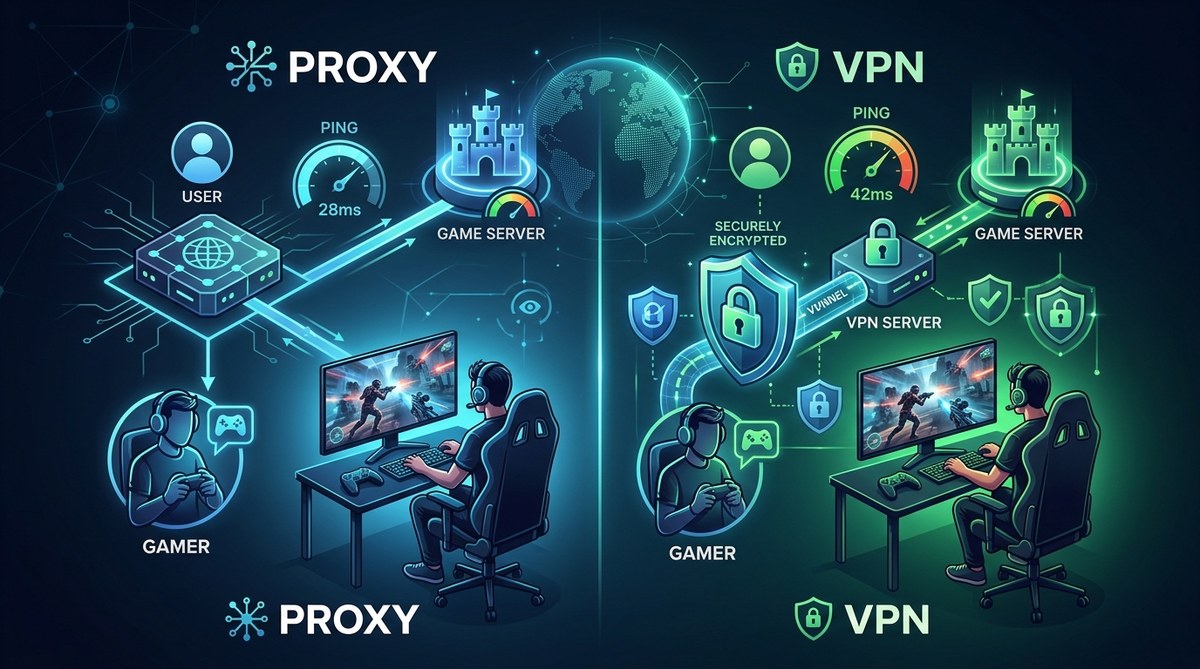
You are staring at a screen that shows 150 ping. Your crosshair is a split second behind every enemy strafe. You try a proxy server from a list you found, and the ping drops to 90. Then you flip on a VPN, and it jumps back to 130. But the proxy feels sketchy. Does it protect you from DDoS attacks? Can your ISP still see your game traffic? This is the real conflict in the proxy vs VPN gaming debate: you want the lowest possible latency, but you also need solid privacy to keep your IP hidden from toxic players and potential doxxers. Let’s break down exactly what each tool does to your connection and your security, so you can make the right call for your next ranked match.
For competitive gamers, a high quality paid proxy (especially SOCKS5 or residential) often gives lower ping than a VPN because it adds little overhead and no encryption. But a VPN beats a proxy for privacy by encrypting all traffic and preventing IP leaks. If your main worry is getting DDoSd after a trash talk session, use a VPN with a kill switch. If you just need a fast route to reduce lag and don’t care about full privacy, a proxy is lighter and faster.
How Proxies and VPNs Actually Handle Your Gaming Traffic
To understand which tool serves you better, you need to see how they reroute your data.
A proxy sits between your computer and the game server. When you use a proxy, your game traffic gets sent to the proxy server first, and that server forwards it to the game. The game server sees the proxy’s IP address, not yours. A proxy does not encrypt your traffic by default. Some proxy types (like SOCKS5) can handle UDP traffic, which is crucial for many online games.
A VPN creates an encrypted tunnel from your device to the VPN server. All your internet traffic flows through that tunnel, including gaming packets. The VPN server then sends your data to the game server. The encryption adds a small amount of overhead. For CPUs in 2026, that overhead is usually trivial, but it still adds a few milliseconds of latency. VPNs also handle UDP fine with the right protocol (WireGuard is particularly good for gaming because of its low overhead).
The key difference: a proxy skips encryption and processing overhead, which can shave off precious milliseconds. A VPN prioritizes privacy with full encryption, which can protect you from DDoS attacks and ISP throttling but may raise your ping slightly.
Which One Gives You Lower Ping? A Head to Head Look
Ping is the time it takes for a packet to travel from your PC to the game server and back. Both a proxy and a VPN add an extra hop. The question is which hop adds less delay.
| Tool Type | Typical Added Latency | UDP Support | Encryption Overhead | Best For |
|---|---|---|---|---|
| SOCKS5 Proxy | 0-15 ms | Yes (most implementations) | None | Speed focused players who don’t need encryption |
| HTTP/HTTPS Proxy | 20-50 ms | No | Varies with HTTPS | Browsing only; avoid for gaming |
| VPN (OpenVPN) | 15-40 ms | Yes | Moderate (CPU dependent) | Privacy focused; good for DDoS protection |
| VPN (WireGuard) | 5-20 ms | Yes | Very low | Best balance of speed and privacy |
A SOCKS5 proxy is often the fastest option for gaming. It handles UDP, adds almost no overhead, and routes your traffic efficiently. That’s why many players choose a proxy for competitive shooters like Valorant or Call of Duty.
But speed is not the only factor. A VPN like WireGuard can match proxy speeds if the VPN server is well placed and the protocol is optimized. Some pro gamers actually use WireGuard VPNs because they get both low ping and encryption.
Privacy Showdown: What Each Tool Hides (and Doesn’t)
What a Proxy Hides
A proxy hides your real IP from the game server. That means other players cannot see your home address in chat logs or server admin panels. However, your ISP can still see that you are playing a game and which game server you are connecting to. The proxy itself might log your activity, especially if it is a free proxy. Many free proxies are run by attackers who log credentials and sell data. For a reliable experience, you want a paid proxy from a trusted provider.
What a VPN Hides
A VPN hides your real IP and encrypts your traffic. Your ISP can see that you are connected to a VPN server, but they cannot see that you are playing a specific game or hitting a specific server. The VPN provider can see that you are gaming, but if they have a strict no logs policy (and are independently audited), that data is not stored.
Expert advice: “If you are worried about DDoS attacks after a heated online match, a VPN with a kill switch is your best defense. A proxy will hide your IP from the server, but a determined attacker can still hit you if they find your real IP through a WebRTC leak or DNS leak. Encryption makes it much harder for anyone to extract your actual IP.” Check your VPN for leaks
When to Use a Proxy for Gaming
If your main goal is to lower ping or bypass regional restrictions without spending extra on a full VPN plan, a proxy can be a great lightweight solution. Here is a practical process to set one up for a specific game.
-
Choose your proxy type. For gaming, pick a SOCKS5 proxy from a reputable paid provider. Avoid free HTTP proxies because they don’t handle UDP and are often slow. If you need residential IPs (e.g., to avoid anti cheat detection), check our residential vs datacenter proxy comparison.
-
Find the server address and port. Your provider will give you an IP and a port number, plus a username and password if authentication is required.
-
Configure your game or system. Many modern games support proxy settings directly. If not, set the proxy at the system level (Windows Settings > Network > Proxy) or use a tool like Proxifier to force the game through the SOCKS5 proxy.
-
Test the connection. Launch the game and check your ping. Use a command like
ping -t <game_server_ip>to see stability. -
Monitor for leaks. Make sure the proxy is not leaking your real IP by visiting an IP check website. Learn how to test for IP leaks.
When a VPN Is the Better Choice
A VPN becomes the clear winner in three situations:
- DDoS protection: If you play competitive games where opponents may try to knock you offline, a VPN’s encryption hides your real IP from the server. Even if someone gets the VPN server IP, they cannot target your home connection.
- ISP throttling: Some ISPs detect gaming traffic and slow it down, especially during peak hours. A VPN masks the type of traffic, so your ISP treats it as generic encrypted data.
- Privacy on public Wi Fi: If you game at a LAN event or a coffee shop, a VPN protects your session from packet sniffers.
In 2026, more gaming focused VPN services offer split tunneling. This lets you route only the game through the VPN while your browser and other apps use the normal connection. That reduces overhead for everything else.
If you decide to go with a VPN, make sure it supports WireGuard and has a built in kill switch. Also check the most common VPN mistakes to avoid compromising your setup.
How to Pick the Right Tool for Your Gaming Setup
Consider your priorities with this bulleted list:
- Lowest possible ping: Use a paid SOCKS5 proxy. Find a server close to the game region.
- Protection from DDoS and swatting: Use a VPN with WireGuard and a kill switch. No proxy can match this.
- Bypassing geo blocks (e.g., accessing a closed beta only in Europe): Both work, but a VPN is easier to set up and more reliable for streaming related tasks.
- Budget: Proxies are often cheaper than VPN subscriptions. Some gaming VPNs cost $5 to $10 per month, while a quality SOCKS5 proxy can be $2 to $3.
- Ease of use: VPN clients are one click. Proxies require manual configuration or third party software. If you are not comfortable with network settings, go with a gaming VPN.
Real World Scenario: Streaming and Gaming at the Same Time
Many gamers stream to Twitch or YouTube while playing. Here, a proxy can cause problems because your streaming software also goes through the proxy, adding latency to both the game and the stream. A VPN with split tunneling is ideal. You route the game through the VPN (for privacy and low ping) and the streaming encoder through your normal connection (to keep upload speed high). This keeps your stream stable and your game protected.
If you stick with a proxy, you may need to set up custom routing rules. That is more complicated and prone to errors.
Choose Your Weapon, Then Test It
There is no universal winner in the proxy vs VPN gaming debate. The best tool depends on what you value more: raw speed or bulletproof privacy.
If you are a tournament grinder who needs every millisecond, grab a paid SOCKS5 proxy and test it on your main games. If you are a streamer who worries about getting targeted by angry viewers, invest in a solid VPN with WireGuard and a kill switch.
The important thing is to test before you commit. Run ping tests with each tool for a week. Check for IP leaks. Make sure your connection is stable. The right choice will feel invisible. You will forget it is even there. Your enemies, however, will not forget the scoreboard.