 By carl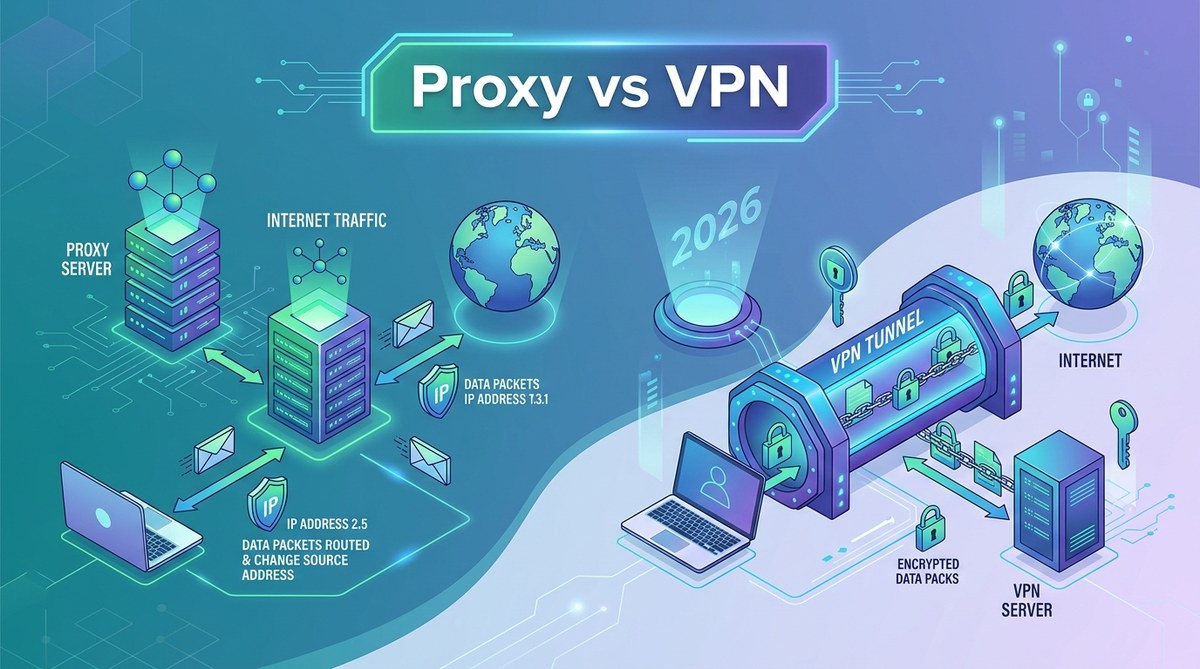
You keep hearing you need protection online. Maybe a friend recommended a VPN. Perhaps you saw a free proxy list on Reddit. Both tools promise privacy. But they work in completely different ways. Pick the wrong one, and you might think you are hidden when your data is actually wide open. Here is the plain truth about proxy vs VPN.
A proxy is a middleman that changes your IP address for specific traffic. A VPN encrypts everything leaving your device and routes it through a secure tunnel. Use a proxy for lightweight tasks like unblocking a single site or scraping public data. Use a VPN for real privacy on public Wi Fi, protecting passwords, or hiding your browsing from your ISP. Choose based on what you want to keep safe.
What a Proxy Server Actually Does
A proxy server sits between your device and the internet. When you send a request, the proxy forwards it using its own IP address. The website sees the proxy, not you. That is the whole trick.
Proxies come in several flavors. You have HTTP proxies that handle web traffic only. SOCKS5 proxies handle any protocol but do not encrypt data. Transparent proxies are the ones schools and coffee shops use without telling you. Then there are residential proxies, which use real home IP addresses, and datacenter proxies, which come from cloud servers.
The catch is visibility. Most proxies do not encrypt your traffic. Your ISP can still see what you are doing. The proxy only hides your IP from the destination website. For a closer look at how your ISP tracks you, check out what your ISP can see when you browse.
Expert advice: Think of a proxy like a return address sticker. You slap a fake one on the envelope, but the post office can still read the letter inside. Use a proxy when you just need to hide where the package came from, not what is in it.
What a VPN Actually Does
A VPN (Virtual Private Network) creates an encrypted tunnel between your device and the VPN server. Every piece of data that passes through that tunnel is scrambled. Your ISP sees only encrypted gibberish. Websites see the VPN server’s IP address. Your real IP, your location, and your activity stay hidden.
VPNs work at the operating system level. That means once you turn it on, every app on your device is protected. Not just your browser. Not just one tab. All traffic.
There are tradeoffs. Encryption takes processing power, so VPNs can slow your connection more than proxies. And not all VPN providers are trustworthy. Some log your activities and sell that data. If you want to know what to look for, read our guide on understanding VPN logging policies.
Proxy vs VPN Side by Side
Here is where the rubber meets the road. The table below shows the key differences at a glance.
| Feature | Proxy | VPN |
|---|---|---|
| Encryption | None for most proxies | Full encryption for all traffic |
| Coverage | Single app or browser | Entire device |
| Speed | Generally faster | Slower due to encryption overhead |
| Privacy from ISP | None | High |
| Setup difficulty | Simple IP and port config | App installation or system setup |
| Kill switch | Rarely available | Common in paid VPNs |
| Best use case | Light masking, web scraping | Full privacy, secure browsing |
Why encryption matters more than you think
Without encryption, anyone on your network can read your traffic. That includes the person on the same coffee shop Wi Fi, your ISP, and the proxy provider itself. A VPN wraps your data in a layer that makes it unreadable to anyone except the VPN server.
Coverage is a real difference
A proxy only affects the application you configure it in. Set a proxy in Chrome, and Firefox still uses your real IP. A VPN protects your entire system. Every browser, every chat app, every background update. For students and remote workers who use multiple tools at once, a VPN is usually the smarter pick.
Speed tradeoffs are not as big as you think
Proxies are faster because they do not encrypt anything. They just forward packets. But modern VPN protocols like WireGuard make the speed gap much smaller. In many cases, you will not notice the difference unless you are gaming or streaming 4K video. For everyday browsing, a good VPN is plenty fast. If you do run into slowdowns, here are some fixes for a sluggish VPN connection.
When You Should Choose a Proxy
Proxies have a place in your privacy toolkit. They just are not for everything.
When a proxy makes sense:
- You need to check how a website looks from another country
- You are scraping publicly available data for a project
- You want to access a specific blocked URL at work or school
- You run a social media automation tool that needs rotating IPs
- You are a developer testing geo locked features
For any of these tasks, a proxy is lightweight and easy to set up. You just plug in the IP and port, and you are done. If you want to do it yourself, here is a step by step guide to setting up a proxy server on Windows.
The danger zone for proxies
Free proxies are where things go wrong. Many free proxy lists are maintained by hackers. They log your credentials, inject ads, or steal session cookies. If you connect to a free proxy and log into your bank account, you might as well hand over the password. We have more details on why free proxies are dangerous.
When You Should Choose a VPN
Use a VPN when privacy is the goal, not just IP masking.
When a VPN is the right call:
- You are on public Wi Fi at a hotel, airport, or coffee shop
- You want to hide your browsing history from your ISP
- You travel frequently and need secure access to work resources
- You want to stop websites from building a profile on you
- You are torrenting or using P2P file sharing
For remote workers especially, a VPN is essential. Many companies require it for access to internal systems. If your employer does not provide one, consider setting up your own. Here is how to choose the right VPN protocol for your needs.
A common VPN mistake to avoid
Some people connect to a VPN and assume they are completely invisible. That is not true. VPNs hide your IP and encrypt your traffic, but websites can still fingerprint your browser. They can track you through cookies, screen resolution, and installed fonts. A VPN is a powerful tool, but it is not a cloak of invisibility. For more on this, check out browser fingerprinting explained.
Can You Use Both a Proxy and a VPN Together?
Yes, you can chain them. Some setups use a VPN as the outer layer and a proxy inside it. This gives you IP rotation and encryption at the same time. It is called a proxy over VPN setup.
But is it worth it? For most people, no. A VPN alone provides enough privacy. Adding a proxy on top introduces complexity and potential leaks. If you accidentally misconfigure something, your real IP could pop through.
People who need this setup include:
- Web scrapers who need to avoid rate limiting from large platforms
- Researchers accessing sensitive data from restrictive countries
- Security testers running controlled penetration tests
- Journalists communicating with anonymous sources
- Developers testing geo specific features across multiple regions
For everyone else, a good VPN is enough. If you want maximum anonymity, consider using Tor instead. We compare all three options in this guide on Tor vs VPN vs proxies.
How to Make the Choice in 30 Seconds
You do not need a complicated flowchart. Ask yourself two questions.
Question one: Do I need encryption?
If the answer is yes, get a VPN. If you are entering passwords, banking online, or working remotely, encryption is non negotiable. A proxy will not protect you.
Question two: Do I need to protect one specific thing or everything?
If you only need to change your IP for one browser tab or one app, a proxy can work. If you want your whole device protected, choose a VPN.
Which scenario sounds like you?
- A student on campus Wi Fi checking grades and email. Use a VPN.
- A developer testing a US only site from abroad. Use a proxy.
- A remote worker accessing company files from a hotel. Use a VPN.
- Someone scraping product prices for a side project. Use a proxy.
- A parent setting up child safety filters on a home network. Use a VPN on the router.
Still unsure? Read our full comparison of SOCKS5 proxy vs VPN for a deeper breakdown.
Common Privacy Traps to Avoid
Both proxies and VPNs can give you a false sense of security. Here are three traps people fall into.
Trap one: Thinking a free proxy means free privacy
Free proxies cost you in data. They log, they inject, they expose. The same goes for free VPNs that sell your data. If you are not paying for the product, your data is the product.
Trap two: Forgetting the kill switch
A VPN connection can drop. When it does, your real IP hits the internet. A kill switch stops all traffic until the VPN reconnects. If your VPN does not have one, setting up a VPN kill switch should be a priority.
Trap three: Ignoring DNS leaks
Your browser sends DNS requests to translate website names into IP addresses. If those requests bypass your VPN, your ISP sees every site you visit. This is called a DNS leak. You can learn how to prevent DNS leaks while using a VPN with a simple test.
Picking the Right Tool for Your Real Needs
Privacy is not one size fits all. Your college student nephew needs different protection than a freelance developer or a traveling consultant. The proxy vs VPN decision comes down to what you actually do online.
If you are just trying to watch a show from another region, a proxy works fine. If you are signing into your bank account on random Wi Fi, a VPN is the only safe choice. Know the difference. Use the right tool. And never trust a free proxy with your login credentials.
Start with a trustworthy VPN for your daily browsing. Keep a couple of reliable proxies in your pocket for specific tasks like testing or scraping. That combination gives you flexibility without sacrificing security.