 By carl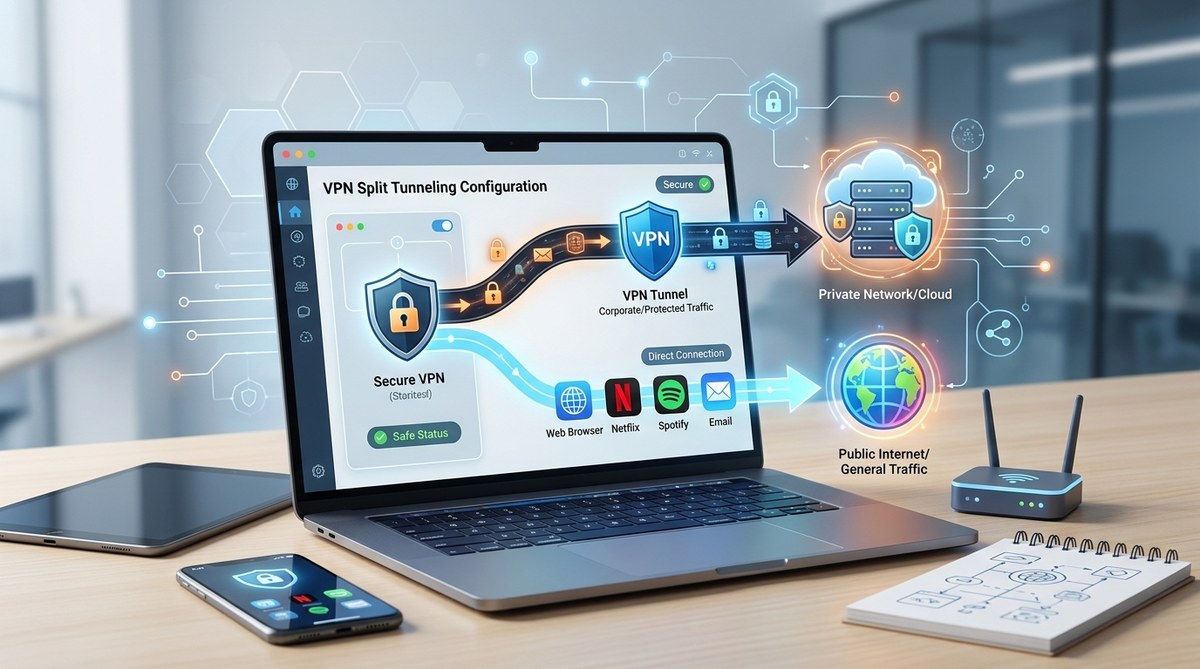
Getting the most out of your VPN often means finding the right balance between security and speed. VPN split tunneling is a powerful feature that allows you to route some traffic through the VPN while letting other data access the internet directly. This flexibility can boost performance and help manage your network more efficiently. However, if not configured properly, it can introduce serious privacy risks. This guide walks you through the essentials of VPN split tunneling, how to set it up safely, and common pitfalls to avoid.
VPN split tunneling lets you improve speed and manage network resources by choosing which traffic passes through the VPN. Proper configuration and security practices are vital to protect your privacy and avoid leaks or exposure to malicious actors.
Understanding VPN split tunneling and its role in your network
VPN split tunneling is a feature that enables you to decide which apps or websites use the encrypted VPN connection and which access the internet directly. This setup offers a way to speed up browsing, reduce bandwidth usage, and access local network resources while still protecting sensitive data.
How split tunneling works in practical terms
Imagine you’re working remotely and want to access your company’s internal network securely while streaming videos from a local service. With split tunneling, you can route your work-related traffic through the VPN for security, and let streaming go directly to avoid unnecessary VPN encryption delays. This selective routing reduces latency and improves overall performance.
Different types of split tunneling
There are several methods to implement split tunneling:
- App-based split tunneling: Specify individual applications that use the VPN or bypass it.
- URL or domain-based split tunneling: Route traffic to certain websites through the VPN while others access the internet directly.
- Inverse split tunneling: Exclude specific apps or sites from the VPN, letting all other traffic go through the encrypted tunnel.
- Route-based split tunneling: Set up network routes that determine which data flows through the VPN based on IP ranges.
The benefits and potential risks of split tunneling
What makes split tunneling attractive
- Improves browsing speed by reducing VPN encryption load.
- Saves bandwidth, especially on limited data plans.
- Allows access to local network devices and resources.
- Provides flexibility for different online activities.
Common security pitfalls to watch out for
- Exposure of sensitive data if misconfigured.
- Increased risk of IP leaks or DNS leaks.
- Malicious apps bypassing security controls.
- Potential access to malicious sites if domains are not properly managed.
“Properly configuring split tunneling is crucial. Without safeguards, you risk exposing your real IP address or sensitive data to outsiders,” warns cybersecurity expert Jane Doe.
When to consider using split tunneling
Use split tunneling when performance is critical, and you are confident in your security measures. For example, accessing local devices, streaming content, or managing bandwidth for non-critical apps. Avoid it when handling sensitive tasks such as online banking or transmitting confidential business data.
How to configure VPN split tunneling safely
Setting up split tunneling requires careful planning and execution. Follow these steps to do it securely:
- Assess your needs: Determine which traffic must go through the VPN and which can bypass it. Prioritize sensitive activities for VPN routing.
- Choose a compatible VPN provider: Ensure your VPN offers robust split tunneling options. Check their security policies and leak protection features.
- Use app or domain-based rules: Configure split tunneling rules to limit exposure. For example, route only your work apps through the VPN.
- Implement DNS leak protection: Use DNS servers that match your VPN’s settings to prevent leaks that reveal your true location.
- Enable auto kill switch features: This ensures that if the split tunneling setup fails, your connection reverts to a fully encrypted VPN connection.
- Test your configuration: Use tools like dnsleaktest.com to verify your traffic routes correctly and no leaks occur.
- Regularly review rules: Update your split tunneling rules as your needs change or new threats emerge.
Practical process for safe split tunneling setup
- Select your VPN client that supports split tunneling.
- Configure rules for apps or websites you want to access directly.
- Enable leak protection and automatic kill switch features.
- Test the setup thoroughly before engaging in sensitive activities.
- Maintain software: Keep your VPN and security tools up-to-date.
Techniques to avoid common mistakes
| Technique | What to avoid |
|---|---|
| Using broad domain rules | Excluding entire domains that could include malicious subdomains |
| Ignoring DNS leak tests | Failing to verify DNS settings can lead to leaks |
| Not updating rules regularly | Rules can become outdated, exposing new vulnerabilities |
| Overlooking kill switch | Without it, traffic may bypass VPN during disconnections |
Best practices for maintaining privacy with split tunneling
- Always keep your VPN software updated to benefit from the latest security features.
- Limit split tunneling rules to only trusted applications and sites.
- Avoid routing sensitive activities outside the VPN.
- Use strong, unique passwords for VPN accounts.
- Regularly run leak tests to ensure your setup remains secure.
- Be cautious when allowing non-encrypted traffic, especially on public Wi-Fi networks.
Common misconceptions about split tunneling security
Misconception: Split tunneling always exposes your data.
Reality: When configured correctly with leak protection and trusted rules, it can be safe. The key is to avoid broad or poorly managed rules.
Misconception: It’s impossible to prevent leaks with split tunneling.
Reality: Modern VPNs offer features like DNS leak protection and kill switches that help safeguard your privacy.
“The biggest mistake is not testing your setup after configuration. Regular checks are essential to confirm your traffic routes as intended,” emphasizes security analyst John Smith.
How to troubleshoot split tunneling issues
- Verify rules are correctly applied.
- Use leak testing tools after setup.
- Check for VPN software updates.
- Confirm DNS settings match your VPN provider.
- Disable conflicting network services.
- If problems persist, consult your VPN provider’s support resources.
Final thoughts: Making split tunneling work for you
VPN split tunneling can be a game-changer for managing network resources and improving browsing performance. When properly configured and regularly tested, it offers both flexibility and security. Remember that the key to safe usage lies in understanding your needs, applying precise rules, and maintaining your setup with updates and leak tests. With a cautious approach, you can enjoy the benefits without exposing yourself to unnecessary risks.
Applying split tunneling wisely in 2026
Implementing split tunneling is about balancing convenience with security. Take your time to set up rules carefully and always verify that your data stays protected. Whether for work, streaming, or managing bandwidth, this feature can be a valuable tool if you follow best practices. Stay vigilant, keep your software current, and enjoy a faster, safer browsing experience.