 By carl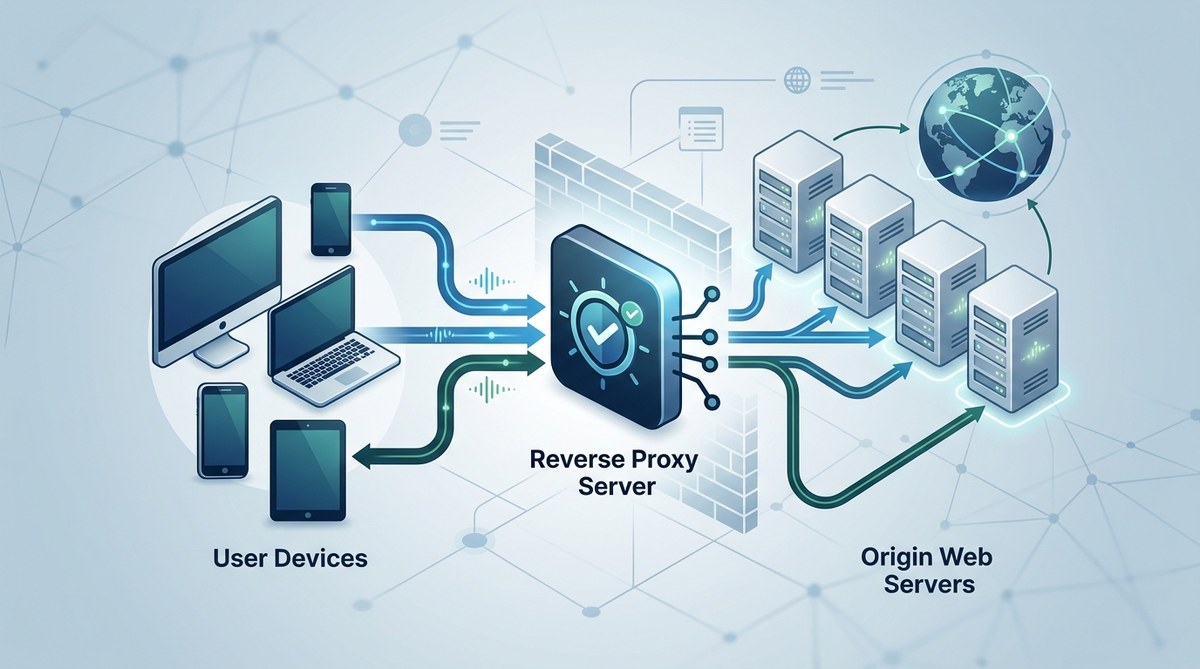
A reverse proxy is a server that acts as an intermediary between users and web servers. Instead of users connecting directly to a website’s server, their requests go through the reverse proxy first. This setup offers numerous advantages for website owners and developers. Whether you’re managing a busy online store or a corporate website, understanding reverse proxies can help you optimize your site for speed, security, and reliability.
A reverse proxy is a server that sits in front of web servers, managing requests from users. It enhances security, boosts performance through caching and load balancing, and simplifies infrastructure management for websites of all sizes.
How a reverse proxy works in web infrastructure
When a user makes a request to access a website, that request first hits the reverse proxy server. The reverse proxy then forwards the request to the appropriate backend server, retrieves the response, and sends it back to the user. This process is transparent to the user, who sees only the website they requested.
The reverse proxy acts as a gatekeeper, controlling traffic, filtering malicious requests, and managing server resources. It can also serve static content directly, reducing the load on backend servers and improving site speed.
Major reasons websites use reverse proxies
1. Improving security
One of the main benefits of deploying a reverse proxy is enhanced security. The proxy can filter out malicious traffic, defend against attacks like distributed denial of service (DDoS), and hide the real IP addresses of backend servers. This makes it harder for attackers to target specific servers directly.
2. Boosting performance with caching and load balancing
Reverse proxies can cache frequently accessed content. When a user requests a cached page, the proxy delivers it instantly without involving the backend server. This reduces server load and speeds up page delivery.
They also distribute incoming traffic evenly across multiple servers. This process, called load balancing, prevents any single server from becoming overwhelmed, ensuring smooth performance even during traffic spikes.
3. Simplifying SSL encryption
Managing SSL certificates on multiple servers can be complex. A reverse proxy can handle all SSL/TLS encryption and decryption, centralizing certificate management. This setup simplifies certificate renewal and improves security.
4. Centralized logging and monitoring
A reverse proxy provides a single point to monitor traffic, analyze logs, and detect unusual activity. This visibility helps in troubleshooting and maintaining site health.
5. Scalability and redundancy
As your website grows, a reverse proxy makes it easier to add or remove backend servers without disrupting service. It supports redundancy, so if one server fails, the proxy can reroute traffic to healthy servers.
How to implement a reverse proxy in your web setup
Implementing a reverse proxy involves these steps:
-
Choose your reverse proxy software: Popular options include Nginx, HAProxy, and Apache HTTP Server with mod_proxy.
-
Configure your proxy settings: Set up rules for forwarding requests, caching, SSL termination, and load balancing.
-
Update DNS records: Point your domain to the reverse proxy server’s IP address.
-
Test your setup: Ensure requests are correctly routed, SSL works, and performance improves.
-
Monitor and optimize: Regularly check logs, cache hits, and server health to keep your setup efficient.
Practical process for setting up a reverse proxy
- Install your proxy software on a dedicated server or cloud instance.
- Configure proxy rules to route traffic to your backend servers.
- Set up SSL certificates on the proxy for secure connections.
- Update DNS to point your domain to the proxy’s IP.
- Test your website to verify correct routing and security.
- Implement caching policies to improve load times.
- Monitor traffic and performance over time, adjusting configurations as needed.
Common pitfalls and mistakes
| Technique / Mistake | Explanation |
|---|---|
| Not updating DNS properly | If DNS isn’t pointed correctly, users won’t reach your site. |
| Overlooking SSL configuration | Missing SSL setup leaves traffic unencrypted, risking security. |
| Poor cache management | Incorrect caching settings can lead to outdated content or performance issues. |
| Ignoring logs | Failing to monitor logs can hide security threats or performance bottlenecks. |
| Not testing thoroughly | Skipping tests may cause routing errors or security gaps. |
“Regularly review your reverse proxy configuration and logs. This helps spot issues early and ensures your website runs smoothly and securely.” – Web security expert
Techniques to optimize your reverse proxy setup
- Use caching for static assets like images and scripts.
- Balance load across servers based on real-time traffic.
- Enable SSL termination at the proxy for simplicity.
- Regularly update your proxy software for security patches.
When a reverse proxy is the right choice
If your website experiences high traffic, requires enhanced security, or needs simplified management, a reverse proxy becomes invaluable. It helps maintain performance during traffic surges and provides a flexible architecture for scaling.
For small sites with minimal traffic, a reverse proxy might be less necessary. However, as your site grows or if security is a top priority, implementing one can save time and resources in the long run.
Final thoughts on mastering reverse proxies
Understanding what a reverse proxy is and how it functions allows you to better control your web infrastructure. It acts as a shield and a speed booster, making your website more resilient and user-friendly.
By carefully planning your setup, avoiding common mistakes, and continuously monitoring your system, you can harness the full power of reverse proxies. Whether you run a small blog or a large e-commerce platform, integrating a reverse proxy can transform your website’s performance and security.
Keep your web infrastructure flexible and secure
Adding a reverse proxy to your website setup is a smart move for scalable, secure, and fast online experiences. Start by selecting the right software, configuring it carefully, and maintaining it regularly. Over time, this investment pays off with a more robust and reliable website.