 By carl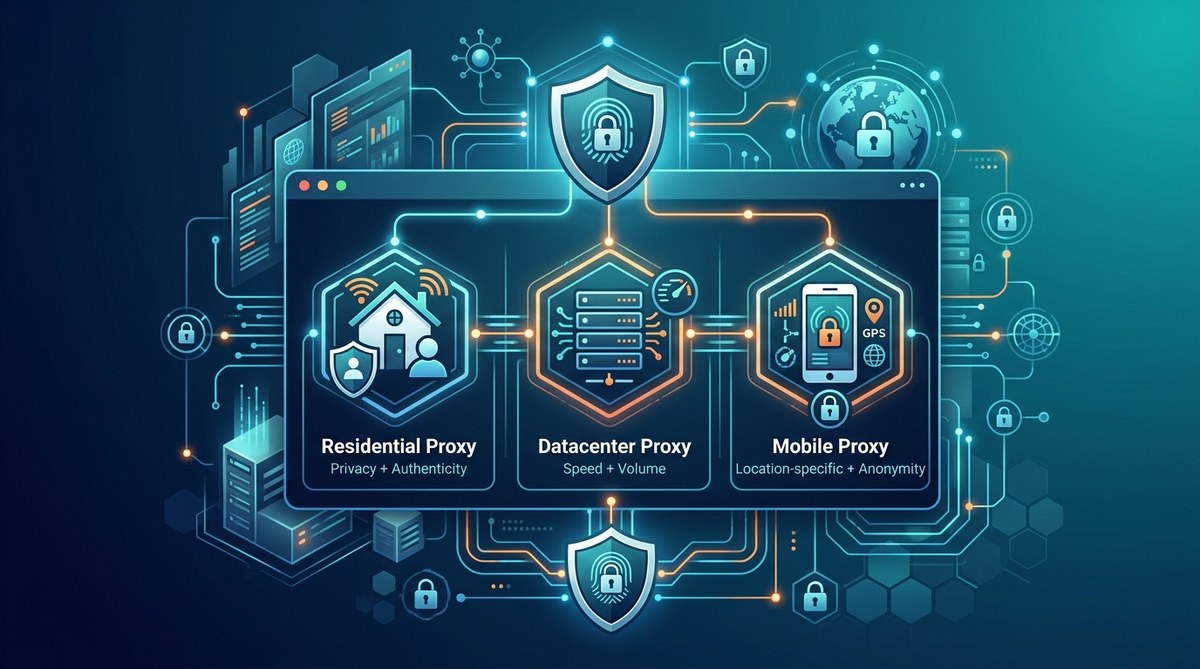
Proxies are powerful tools in the quest for online privacy. They act as intermediaries between your device and the websites you visit, masking your real IP address and adding layers of security. But with so many types available, knowing which one fits your needs can be confusing. Whether you want to surf anonymously, access geo-restricted content, or protect sensitive data, understanding the different proxy options helps you choose wisely and use them responsibly.
Choosing the right proxy type depends on your privacy goals. From transparent proxies to high-anonymity options, each has unique features suited for specific online activities. Proper understanding ensures you maximize benefits while avoiding common pitfalls in proxy usage.
What are proxy types and why do they matter?
Proxy types for privacy differ mainly in how they mask your identity, the level of anonymity they provide, and their technical features. Some proxies are designed for basic tasks like content caching, while others are built to hide your identity completely. Selecting a proxy without understanding its core features can expose you to risks or limit your privacy goals. Let’s look at the most common types and what makes each unique.
Common proxy types and their privacy features
1. Transparent proxies
Transparent proxies are the simplest form. They reveal your original IP address and do not provide anonymity. These are often used by networks for caching or content filtering. They’re not ideal for privacy but can help with basic content control.
2. Anonymous proxies
Anonymous proxies hide your IP address from the websites you visit. They do not reveal that you are using a proxy, improving your privacy without hiding your identity completely. They are often used by users who want a degree of anonymity but do not require full concealment.
3. Elite proxies (high-anonymity proxies)
Elite proxies go a step further. They hide your IP address and do not disclose that you are using a proxy. They are highly effective for users who need maximum privacy and are often used for activities like secure browsing, bypassing censorship, or accessing restricted content without leaving traces.
4. Residential proxies
Residing on real devices, residential proxies use IP addresses linked to actual homes or businesses. They provide high levels of anonymity and are less likely to be blocked. This makes them ideal for web scraping, social media management, or any activity requiring undetectable identity masking.
5. Datacenter proxies
These proxies come from data centers and are not linked to real residential addresses. They tend to be faster and cheaper but are more easily detected and blocked by websites. They suit tasks like bulk data collection where speed outweighs stealth.
6. Mobile proxies
Mobile proxies use IP addresses assigned to mobile devices. They are great for mimicking real mobile traffic, making them useful for app testing, mobile-specific content access, or avoiding detection in mobile app environments.
7. SOCKS proxies
SOCKS proxies are versatile and can handle all types of traffic, including P2P, torrents, or gaming. They are not limited to web traffic and are often used for secure, high-speed connections. They can be configured for high privacy levels when combined with other features.
8. HTTP and HTTPS proxies
HTTP proxies work specifically for web traffic. HTTPS proxies add encryption for secure browsing. They are suitable for accessing encrypted sites but do not encrypt all types of traffic, making them less versatile than SOCKS proxies.
How to choose the right proxy for your privacy needs
Selecting the correct proxy type involves understanding your goals and technical requirements:
-
Identify your activity: Are you browsing casually, scraping data, managing multiple social media accounts, or accessing geo-restricted content? The activity dictates the level of anonymity needed.
-
Determine your privacy level: If maximum stealth is necessary, elite or residential proxies are best. For less sensitive tasks, anonymous proxies may suffice.
-
Consider speed and cost: Datacenter proxies are fast and affordable but less private. Mobile or residential proxies offer better concealment at higher costs.
-
Evaluate technical compatibility: For P2P or torrenting, SOCKS proxies are suitable. For secure browsing, HTTPS proxies or VPNs may be better.
Practical process to select a proxy:
- List your primary activity and privacy needs.
- Research proxy types that fit these needs.
- Test a few options with free trials or low-cost plans.
- Monitor performance and detect any leaks or blocks.
- Use proxy management tools to rotate IPs and maintain anonymity.
Best practices for using proxies responsibly
- Always verify proxy reliability: Use trusted providers to avoid malicious or compromised proxies.
- Avoid free proxies for sensitive activities: They often log data or inject ads.
- Combine proxies with VPNs: For additional security, using a VPN alongside a proxy can offer a higher privacy level.
- Configure your settings carefully: Misconfigurations can leak your IP or expose your data.
- Stay informed about legal implications: Proxy use might be restricted in some regions or for certain activities.
Common mistakes to avoid
| Technique | Mistake | Consequence |
|---|---|---|
| Using free proxies | Data logging and security risks | Data theft or exposure |
| Relying solely on IP masking | DNS leaks or WebRTC leaks | Identity exposure |
| Not rotating IPs | Easy detection and blocking | Reduced anonymity |
| Ignoring proxy provider reputation | Malicious proxies | Malware or data theft |
Expert advice: “Always opt for proxies from reputable providers and incorporate additional layers like encryption and IP rotation. This approach significantly reduces the chances of leaks and keeps your online activities private and secure.”
How to set up a proxy safely
- Choose a proxy type aligned with your privacy goals.
- Subscribe to a trusted proxy service.
- Follow the provider’s instructions for configuration.
- Test your setup for leaks using online tools.
- Regularly update your proxy settings and rotate IPs to maintain privacy.
Example: configuring a SOCKS5 proxy
To set up a SOCKS5 proxy, you can follow a step-by-step guide like the one found in the Proper setup prevents accidental leaks and ensures your activities stay hidden.
Keeping your privacy shield strong
Using proxies is a significant step toward safeguarding your online presence. Remember that proxies alone do not provide complete security. Combining them with other tools such as VPNs, secure browsers, and privacy-focused extensions creates a more robust shield.
A final word on proxy types for privacy
Choosing the right proxy type for your privacy needs is about understanding the trade-offs between speed, stealth, and cost. High-anonymity options like residential or elite proxies offer the best privacy but may come at a higher price. Lower-tier proxies like datacenter proxies are faster and cheaper but less discreet. Always align your choice with your activity and security goals.
Applying these insights helps you stay safe online, access content freely, and protect your data from prying eyes. Take your time to research, test, and rotate proxies to keep your digital footprint as small and untraceable as possible.