 By carl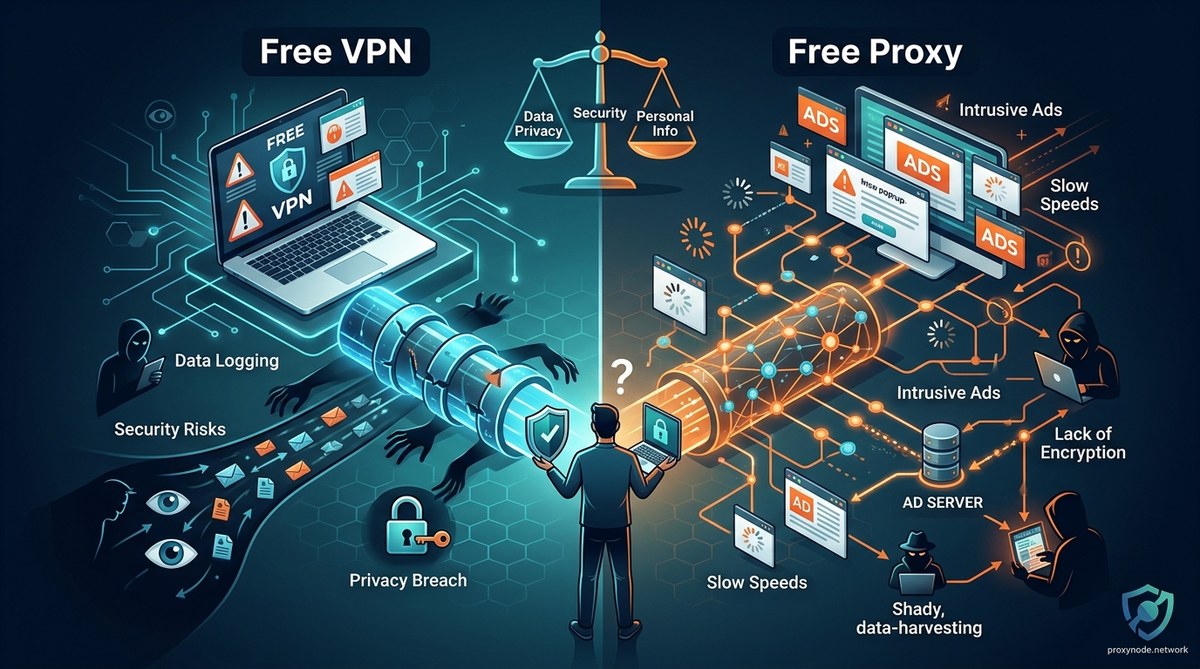
You’re looking for a way to browse anonymously or access blocked content without spending money. The internet offers two main options: free VPNs and free proxies. Both promise privacy and access, but the reality is far more complicated than the marketing suggests.
Free VPNs and free proxies both hide your IP address, but they differ dramatically in security, privacy, and how they make money. Free VPNs encrypt your traffic but often log data and inject ads. Free proxies are faster but rarely encrypt anything, leaving your data exposed. Neither is truly free: you pay with your privacy, security, or bandwidth. Understanding these trade-offs helps you choose the right tool or decide if paying for privacy is worth it.
Understanding What Each Tool Actually Does
A VPN creates an encrypted tunnel between your device and a remote server. All your internet traffic passes through this tunnel, making it unreadable to anyone watching.
A proxy acts as a middleman. Your requests go to the proxy server first, which then fetches content on your behalf. Your IP address gets hidden, but the connection usually isn’t encrypted.
The difference matters more than you think.
VPNs work at the operating system level. Once connected, every app on your device routes through the VPN server. Your email, browser, messaging apps, everything.
Proxies typically work at the application level. You configure your browser to use a proxy, but other apps continue connecting directly. Some proxies like SOCKS5 can handle more traffic types, but you still need to configure each application separately.
Both tools change your apparent location. Websites see the VPN or proxy server’s IP address instead of yours. This helps bypass geographic restrictions and makes basic tracking harder.
But that’s where the similarities end.
The Real Cost of Free VPN Services
Free VPN providers face a simple problem: servers cost money. Bandwidth costs money. Maintenance costs money.
They need to generate revenue somehow.
Many are free VPNs selling your data to advertising networks and data brokers. Your browsing history, app usage, and connection metadata become products.
Some inject advertisements into websites you visit. You’ll see extra banner ads, pop-ups, or modified search results. The VPN literally rewrites web pages before showing them to you.
Others limit your experience to push you toward paid plans. You get:
- Severely restricted bandwidth (often 500MB to 2GB per month)
- Slow connection speeds during peak hours
- Access to only one or two server locations
- Frequent disconnections
- No customer support
The encryption itself might be weak or improperly implemented. Some free VPNs use outdated protocols or skip encryption entirely while claiming to protect you.
The most dangerous free VPNs are the ones that work perfectly. They’re smooth, fast, and reliable because they’re efficiently harvesting and selling your data to fund the operation.
Understanding VPN logging policies reveals that many free providers keep detailed logs of:
- Connection timestamps
- IP addresses (both yours and the VPN server’s)
- Bandwidth usage
- Websites visited
- DNS queries
These logs can be sold, subpoenaed, or leaked in a data breach.
What Free Proxies Give Up for Speed
Free proxies take a different approach. Most don’t even pretend to offer privacy.
They’re transparent about being basic IP masking tools. You get speed and simplicity. You give up security and anonymity.
HTTP proxies send your traffic in plain text. Anyone monitoring the connection between you and the proxy can read everything. Your ISP, network administrator, or anyone with network access sees your passwords, messages, and browsing activity.
HTTPS proxies encrypt traffic between you and the proxy server, but only for HTTPS websites. HTTP sites remain exposed. Plus, the proxy itself can still read everything.
SOCKS5 proxies handle more protocol types and offer better performance, but most free SOCKS5 servers don’t encrypt traffic either. You can learn how to set up a SOCKS5 proxy, but setup doesn’t solve the fundamental security problem.
Why free proxies are dangerous comes down to three main issues:
- No accountability: Anonymous operators can disappear anytime
- Active malware injection: Some proxies modify downloads to include viruses
- Credential harvesting: Login forms get intercepted and stolen
Free proxy lists from forums and Reddit carry additional risks. Many listed proxies are:
- Compromised servers running without owner knowledge
- Honeypots set up to collect data
- Infected machines part of botnets
- Misconfigured corporate proxies accidentally exposed
The hidden costs of using free proxy lists include identity theft, account takeovers, and malware infections that cost far more than a legitimate service.
Comparing Security and Privacy Features
Let’s break down what each tool actually protects.
| Feature | Free VPN | Free Proxy | What It Means |
|---|---|---|---|
| IP address masking | Yes | Yes | Both hide your real IP from websites |
| Traffic encryption | Sometimes | Rarely | VPNs usually encrypt; proxies usually don’t |
| DNS leak protection | Rarely | No | Your DNS queries often expose your activity |
| WebRTC leak protection | Rarely | No | Your real IP can leak through browser features |
| Kill switch | Almost never | Never | Traffic exposed if connection drops |
| Full device protection | Yes | No | VPNs cover all apps; proxies need per-app setup |
| Logging policy | Often logs everything | Logs everything | Both typically record your activity |
| Malware injection risk | Medium | High | Both can modify your traffic |
The encryption difference matters most for sensitive activities.
Banking, shopping, or logging into accounts over an unencrypted proxy exposes your credentials. Anyone between you and the proxy can steal them.
Free VPNs at least encrypt the connection, but what happens to your data when you connect to a VPN depends entirely on the provider’s integrity.
Your ISP can still track you when using a VPN by monitoring connection times, data volumes, and the VPN server you’re connecting to. But they can’t see which websites you visit or what you do there.
With a proxy, your ISP sees you’re using a proxy and can often read your unencrypted traffic in real time.
Speed and Performance Trade-Offs
Free VPNs are usually slower than free proxies.
Encryption adds overhead. Each packet needs to be encrypted before sending and decrypted upon receiving. This takes processing time and adds data size.
Free VPN servers are also overcrowded. Hundreds or thousands of users share the same server, competing for bandwidth. During peak hours, speeds drop dramatically.
Free proxies skip encryption, which makes them faster. You’re still sharing bandwidth with other users, but the server doesn’t need to encrypt and decrypt everything.
For streaming or downloading large files, free proxies often perform better. For streaming specifically, neither free option is ideal, but proxies cause less buffering.
The speed advantage disappears if the proxy is geographically distant. A free proxy in Singapore won’t help much if you’re in New York. Network latency adds seconds to every request.
Connection stability differs too. Free VPNs disconnect frequently to push you toward paid plans. Free proxies often go offline without warning when the server owner loses interest or gets caught.
How to Test If Your Free Tool Is Actually Safe
You can’t trust marketing claims from free providers. Testing is essential.
How to test if your free proxy is actually safe involves several steps:
- Check for IP leaks: Visit an IP checking website before and after connecting. Your IP should change.
- Test for DNS leaks: Use a DNS leak test site. Your DNS queries should route through the proxy or VPN, not your ISP.
- Look for WebRTC leaks: WebRTC can expose your real IP even through a VPN or proxy. Test with a WebRTC leak checker.
- Monitor for injected content: Compare web pages loaded through the tool versus your normal connection. Look for extra ads or modified content.
- Scan downloads: Any files downloaded through the tool should be scanned for malware immediately.
For VPNs specifically, testing your VPN for DNS, IP, and WebRTC leaks takes about five minutes but can save you from serious privacy breaches.
Testing if your VPN is actually working means verifying that:
- Your IP address changes
- Your DNS requests are protected
- Your traffic is actually encrypted
- The kill switch works (if claimed)
- No IPv6 leaks occur
Most free tools fail multiple tests. Your VPN IP address might be leaking through IPv6 if the VPN only handles IPv4 traffic.
Why your VPN might still expose your location through IPv6 leaks is a common problem with free services that don’t properly configure IPv6 routing.
Common Mistakes That Compromise Your Privacy
Using free privacy tools incorrectly makes them even more dangerous.
The biggest mistakes include:
- Trusting the tool completely: Free tools are compromises, not complete solutions. Don’t send sensitive data through them.
- Skipping encryption: Using an HTTP proxy for anything requiring a password is asking for trouble.
- Ignoring disconnections: When your VPN drops, your traffic goes through your normal connection. Without a kill switch, you’re exposed.
- Using the same tool for everything: Don’t mix sensitive activities (banking) with casual browsing (streaming) on the same connection.
- Forgetting about browser fingerprinting: Hiding your IP doesn’t stop websites from tracking you through browser fingerprinting.
Five common VPN mistakes that compromise your privacy include using free services for high-risk activities, ignoring leak tests, and trusting marketing claims without verification.
Many users don’t realize that what happens to your data when you connect to a free proxy server includes potential logging, selling, and modification.
Incognito mode and private browsing don’t actually protect your privacy either. Combining private browsing with a free proxy or VPN doesn’t multiply your protection.
When Each Tool Makes Sense
Despite the risks, free tools have legitimate uses.
Use a free proxy when:
- You need to access geo-blocked content briefly
- Speed matters more than security
- You’re only viewing public information
- You understand and accept the risks
- You’re testing before buying a paid service
Use a free VPN when:
- You need device-wide protection
- You’re on an untrusted network temporarily
- Basic encryption is better than none
- You can tolerate slow speeds and disconnections
- You’ve tested and verified it works properly
Don’t use either when:
- Banking or shopping online
- Logging into important accounts
- Handling work or confidential data
- Your safety depends on anonymity
- You need reliable, consistent access
Five scenarios where a proxy beats a VPN include situations where speed trumps security, like streaming public content or bypassing simple geographic restrictions.
SOCKS5 proxy vs VPN for privacy protection shows that VPNs win for security, but SOCKS5 proxies offer better performance for specific applications.
Better Alternatives to Consider
Free tools are stepping stones, not destinations.
If you need real privacy, should you use a free VPN or pay for premium service? The answer depends on your threat model.
Creating a personal threat model for online privacy helps you understand what you actually need to protect against.
For casual use, paid VPNs cost $3 to $10 monthly. You get:
- No logging policies (verify independently)
- Strong encryption with modern protocols
- Reliable speeds and uptime
- Multiple server locations
- Customer support
- Kill switch and leak protection
For proxy needs, residential vs datacenter proxies depends on whether you need to appear as a regular home user or just need raw speed.
Five legitimate ways to get free proxy access without compromising security include using trial periods, academic access, and open-source solutions you host yourself.
Some middle-ground options:
- Free tiers of paid services: Limited but legitimate
- Browser-based VPNs: Built into Opera and some other browsers
- Tor Browser: Slow but truly anonymous for high-risk situations
- Self-hosted solutions: Technical but fully under your control
Setting up a VPN on your router protects all devices at once but requires a paid service to be practical.
Making an Informed Decision
Your choice between free VPN vs free proxy comes down to understanding what you’re trading.
Free VPNs trade your data and patience for basic encrypted protection. Free proxies trade your security for speed and simplicity.
Neither is actually free. You pay with privacy, security, or convenience.
The question isn’t which free tool is better. The question is whether free tools meet your actual needs without exposing you to unacceptable risks.
For most people, the answer is no. The hidden costs exceed the monetary savings. A compromised account, stolen identity, or malware infection costs far more than a few dollars monthly.
But if you understand the limitations, test thoroughly, and use free tools only for low-risk activities, they can serve as temporary solutions while you evaluate paid options.
Start by testing any free tool before trusting it. Run leak tests. Check for injected content. Monitor your accounts for suspicious activity. And never use free tools for anything you can’t afford to lose.
Your privacy and security are worth protecting properly. Free tools can be part of that strategy, but they shouldn’t be your only defense.