 By carl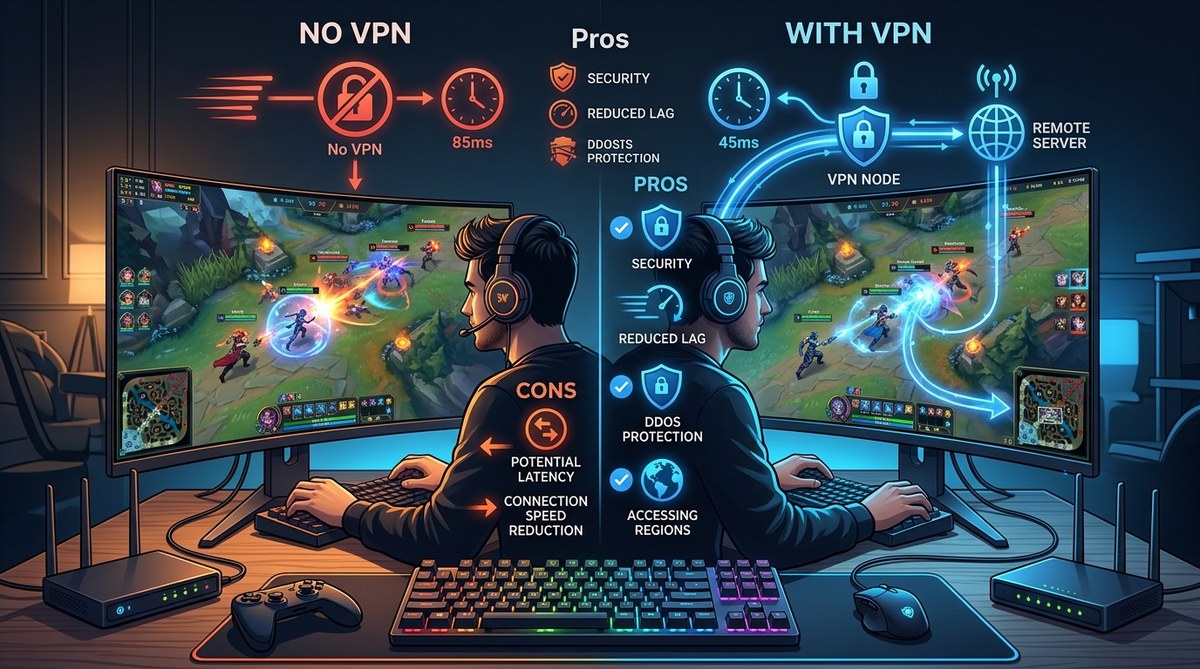
You’re in the middle of a ranked match. Your screen freezes for a split second, then rubberbands you back into a wall. Or maybe you’re staring at a “this game is not available in your region” message while your friends in another state are already playing. That frustration is real, and it’s why a lot of gamers start wondering if a VPN for gaming could be the fix.
A VPN can reroute your traffic through a different server, hide your real IP, and encrypt everything you send. But it’s not a magic wand. Sometimes it helps. Sometimes it makes things worse. The trick is knowing when and how to use one.
A VPN can reduce ping by avoiding ISP throttling, let you play region-locked games, and protect you from DDoS attacks. But it can also add latency if you pick the wrong server or provider. The key is choosing a low-latency VPN, using a nearby server, and enabling split tunneling for non gaming traffic. Test before you commit.
What a VPN Actually Does in a Gaming Session
When you connect to a game server, your data travels from your PC to your internet service provider (ISP), then across the web to the game’s server. Your ISP can see everything: the game you’re playing, your IP address, how long you’re online. Sometimes they throttle gaming traffic because it’s heavy on data.
A VPN creates an encrypted tunnel between your device and a remote server. The game sees the VPN server’s IP instead of yours. Your ISP sees only encrypted traffic, so it can’t tell what kind of data you’re using. That alone can stop throttling and reduce lag spikes.
But that same encryption adds a small amount of overhead. The extra hop to the VPN server also increases physical distance. If you’re not careful, ping goes up.
The Real Pros of Using a VPN for Gaming
1. Lower Ping and Stable Connections (Sometimes)
If your ISP shapes traffic during peak hours, a VPN can hide the nature of your traffic. Many gamers see a 10 to 30 millisecond drop in ping after connecting to a VPN server that’s strategically located. For competitive shooters like Valorant or Call of Duty, that matters.
2. Bypass Region Locks
Games and storefronts like Steam, Epic Games, or PlayStation Network sometimes restrict access based on your physical location. A VPN lets you appear to be in the US, Europe, or Asia to unlock early releases or cheaper prices. Just be aware that some platforms ban accounts for doing this.
3. DDoS Protection
If you stream your gameplay or play on public servers, your IP is visible. Malicious players can launch a DDoS attack to knock you offline. A VPN hides your real IP so attackers only see the VPN server’s address. When they target that, you simply reconnect to a different server.
4. Privacy from Your ISP
Your ISP logs which websites and games you use. With a VPN, that data never reaches them in plain text. For gamers who value privacy, this is a solid layer of protection.
The Real Cons of Using a VPN for Gaming
1. Added Latency (If You’re Careless)
A VPN can’t teleport you. If the VPN server is far from you or far from the game server, your ping will climb. Using a server in New York when you’re in Los Angeles will add at least 30 ms. Using one in a different continent can add 150 ms or more.
2. Connection Drops and Instability
Not all VPN services are built for real time applications. Some drop packets, introduce jitter, or disconnect entirely. A dropped connection mid match can lead to a loss. You need a VPN that supports split tunneling and a kill switch.
3. Game Detection and Bans
Some anti cheat systems (like in Valorant, Fortnite, or Destiny 2) flag VPN connections as suspicious. You might get kicked or even banned. Check the game’s policy before using a VPN. Many esports leagues prohibit VPNs in competitive play.
4. Bandwidth Caps on Free Services
Free VPNs often limit data or throttle speeds severely. They’re not suitable for gaming. If you’re determined to use a VPN, invest in a premium service with unlimited bandwidth and low latency servers.
Performance Tips: How to Get the Best Out of a VPN for Gaming
| Technique | Description | When to Use It |
|---|---|---|
| Choose a nearby server | Pick a VPN server that’s physically close to you and close to the game’s server. | Always, unless bypassing a region lock. |
| Use WireGuard protocol | WireGuard is faster and more efficient than OpenVPN for gaming. | If your VPN provider supports it. |
| Enable split tunneling | Route only game traffic through the VPN. Everything else uses your normal connection. | When you need a VPN for one game but still want low latency on other apps. |
| Disable IPv6 | IPv6 traffic can leak your real IP. Turn it off in your network settings. | Before testing any VPN. |
| Test your ping | Run a ping test to the VPN server and then to the game server. Compare to your base ping. | Every time you try a new server or provider. |
How to Set Up Your VPN for Gaming (Step by Step)
- Choose a gaming friendly VPN. Look for one with low latency servers, WireGuard support, and a kill switch. Avoid free services.
- Install the VPN app on your PC, console (via router), or mobile device.
- Select a server close to you unless you need to bypass a region lock. For region unlocking, pick a server in the target country.
- Test your ping. Open a command prompt and ping the VPN server’s speed test URL or use the VPN’s built in speed tool. Ideally, ping should be under 50 ms for competitive games.
- Enable split tunneling if available. Route only the game’s executable through the VPN. This keeps voice chat, browser, and other apps on your normal connection.
- Enable the kill switch to prevent data leaks if the VPN drops.
- Launch the game and check the server list. If ping looks good, you’re set.
Common Mistakes That Kill Gaming Performance
- Using a VPN server on a different continent to save money
- Forgetting to disable background apps that can consume VPN bandwidth
- Trusting free VPNs for gaming (they often have slow speeds or data caps)
- Not testing split tunneling: it can reduce unnecessary load
- Leaving IPv6 enabled, which can expose your real IP
Expert advice: “The best VPN for gaming is one you don’t notice. If you have to constantly reconnect or your ping jumps above 40 ms over your baseline, that provider isn’t for you.” — Based on community testing from 2026.
How to Choose Between a VPN and a Proxy for Gaming
Some gamers consider proxies because they add less overhead. A HTTP or SOCKS5 proxy can forward traffic without encryption, which saves CPU cycles. But proxies don’t encrypt your data, so your ISP can still see what you’re doing. They also don’t hide your IP from the game server as effectively.
For privacy and anti throttling, a VPN wins. For a lightweight solution to only change your IP for a specific game, a residential proxy might work. Read our breakdown of Residential vs Datacenter Proxies: Which One Should You Actually Use? to understand the difference.
If you’re considering a proxy instead, be aware of the security risks. Many free proxies are dangerous. Check our guide on Why Free Proxies Are Dangerous and What to Use Instead before trying one.
When a VPN Might Not Be the Answer
If you have a fiber connection with under 5 ms ping to your game server, a VPN will almost certainly add latency. For local multiplayer or LAN parties, it’s unnecessary. Also, some competitive games ban VPNs outright. Always check the terms of service.
Making Your Gaming Connection Work in 2026
The decision to use a VPN for gaming comes down to your situation. If you’re being throttled, want to play region locked titles, or need DDoS protection, a properly configured VPN can be a game changer. If you already have a great connection and don’t care about privacy, skip it.
Start with a trial from a reputable provider that offers a money back guarantee. Run your tests during peak hours. If your ping stays below 10 ms more than your baseline, you’ve found a winner. If not, move on.
Remember, the goal is a stable, low latency connection. A VPN is a tool, not a cure all. Use it wisely and your kill/death ratio will thank you.