 By carl
You send a request. The server sees an IP address. Send another request. The server sees a different IP address. That’s rotating proxies in action.
For developers building scrapers, automation engineers managing high-volume data collection, or technical teams needing to avoid detection, rotating proxies solve a specific problem: they make your traffic look like it’s coming from hundreds or thousands of different users instead of one persistent source.
Rotating proxies automatically change your IP address between requests or at set intervals, distributing traffic across multiple endpoints. They help bypass rate limits, avoid blocks, and enable large-scale data collection. The three main types are residential, datacenter, and mobile, each with different trust levels, speeds, and costs. Choose based on your target sites and volume needs.
Understanding rotating proxy mechanics
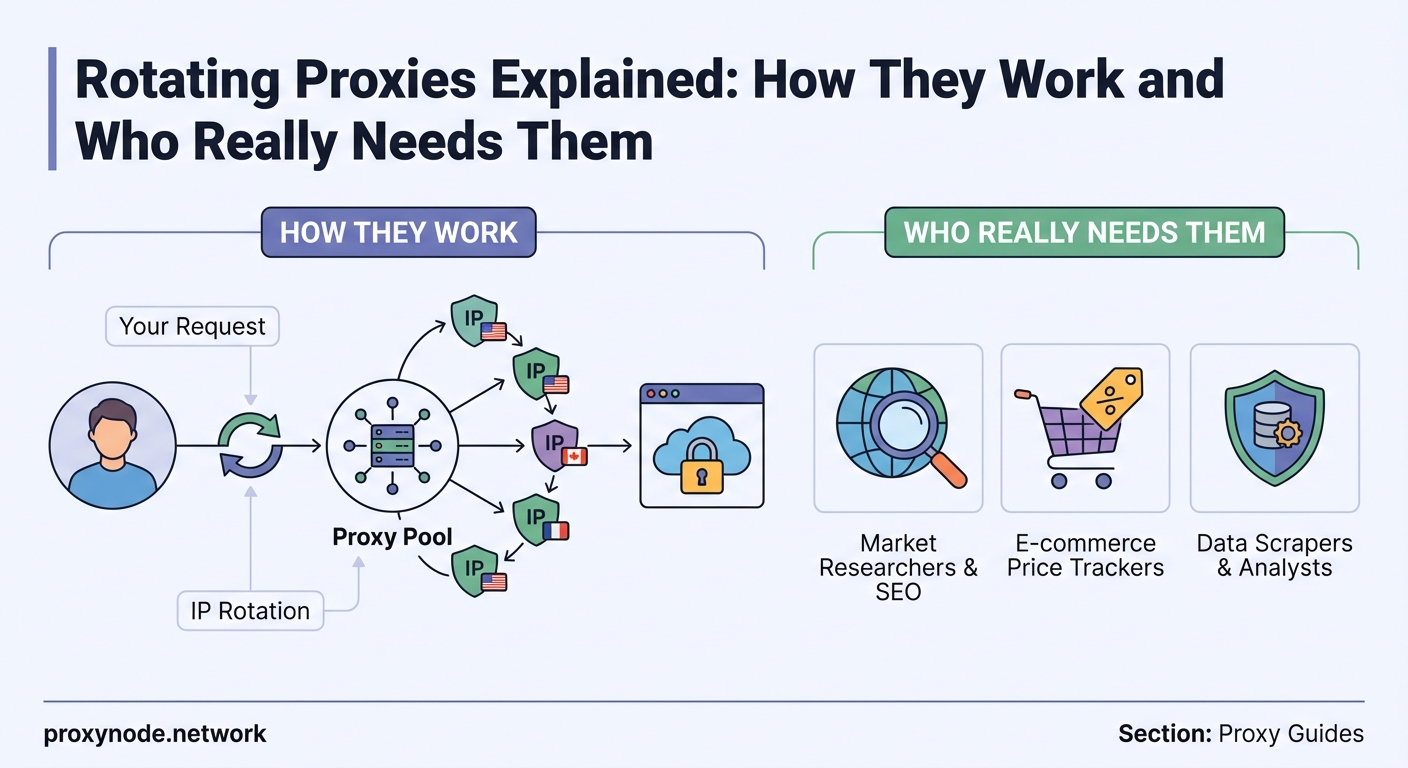
A rotating proxy server sits between your application and the target website. Every time you make a request, the proxy assigns a different IP address from its pool.
This rotation can happen in two ways. Time-based rotation switches IPs at fixed intervals, like every five minutes or every hour. Request-based rotation assigns a new IP for each individual request.
Most commercial proxy providers handle rotation automatically. You connect to one endpoint, and the provider’s infrastructure manages the IP switching behind the scenes. Your code stays simple.
The pool size matters significantly. A provider with 10,000 residential IPs offers more variety than one with 500. Larger pools reduce the chance that any single IP gets flagged or blocked.
Geographic distribution adds another layer. If you’re collecting data from regional websites, you’ll want IPs that match those locations. A German e-commerce site might treat a German IP differently than one from Singapore.
Three types of rotating proxies
Residential proxies
Residential IPs come from real internet service providers and actual homes. When a website sees this traffic, it looks like a regular person browsing from their living room.
These proxies offer the highest trust level. Websites rarely block them because blocking residential IPs means blocking real customers. They’re ideal for sites with aggressive anti-bot measures.
The tradeoff is cost. Residential proxies typically charge per gigabyte of data transferred, and prices run higher than other types. Speeds can also vary since you’re routing through actual home connections.
Datacenter proxies
Datacenter IPs originate from cloud hosting providers and server farms. They’re fast, abundant, and cheap.
Websites can identify datacenter IPs more easily. Many services maintain lists of known datacenter ranges and treat them with suspicion. For sites with strict bot detection, datacenter proxies might get blocked faster.
They work well for less sensitive tasks: monitoring public data, checking prices on tolerant platforms, or testing applications where detection isn’t a concern.
Mobile proxies
Mobile IPs come from cellular networks. They carry the same trust level as residential proxies because they represent real mobile users.
Mobile proxies have a unique advantage: carrier-grade NAT. Multiple users share the same mobile IP, so websites can’t easily block them without affecting legitimate mobile traffic.
They’re the most expensive option and typically have slower speeds due to cellular network limitations. Use them when you need maximum trust and residential proxies aren’t sufficient.
How to implement rotating proxies in your workflow
Integration depends on your provider’s infrastructure. Most services offer two approaches: API-based rotation or gateway rotation.
API-based systems require you to fetch a new proxy address before each request. You make an API call, receive an IP and port, then use that endpoint for your HTTP request.
Gateway rotation is simpler. You connect to one static endpoint, and the provider rotates IPs automatically. Your code treats it like a single proxy, but the backend handles all switching.
Here’s a basic implementation pattern:
- Choose your rotation method based on your provider’s capabilities
- Configure your HTTP client to route through the proxy endpoint
- Set appropriate timeouts to handle slower residential or mobile connections
- Implement retry logic for failed requests
- Monitor your success rate and adjust rotation frequency if needed
Authentication usually happens through username and password in the proxy URL, or via IP whitelisting where you register your server’s IP with the provider.
Practical use cases that justify the cost
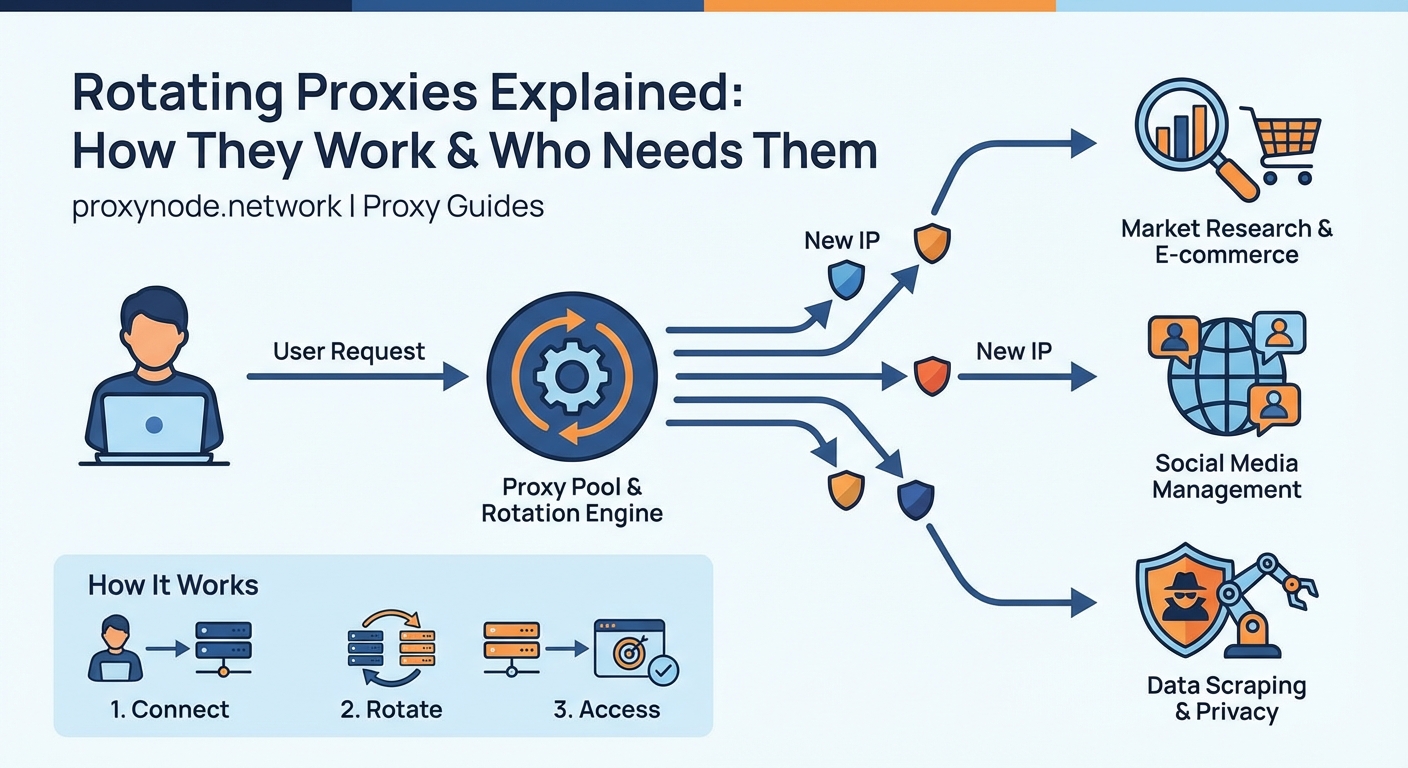
Web scraping at scale is the primary use case. When you’re collecting product data from hundreds of e-commerce sites or monitoring competitor prices across regions, rotating proxies prevent rate limiting and blocks.
SEO professionals use them to check search rankings from different locations without biasing results. A single IP repeatedly searching for the same terms triggers CAPTCHA challenges. Rotating proxies distribute those queries.
Ad verification teams rely on rotating proxies to view advertisements as they appear to users in different regions. Advertisers need to confirm their campaigns display correctly and detect fraud.
Social media management becomes feasible when you’re handling multiple client accounts. Platforms restrict how many accounts you can access from one IP. Rotating proxies let you manage dozens without triggering security flags.
Market research that requires collecting public data from forums, review sites, or social platforms benefits from IP rotation. Sites often limit how much data one visitor can access in a time window.
Static versus rotating: choosing the right approach
Static proxies assign you a dedicated IP that doesn’t change. They’re useful when you need consistency.
| Scenario | Best Choice | Reason |
|---|---|---|
| High-volume scraping | Rotating | Avoids rate limits across thousands of requests |
| Account management | Static | Consistent IP builds trust with platforms |
| Price monitoring | Rotating | Distributes requests across many stores |
| API testing | Static | Simplifies debugging and logging |
| Social media automation | Rotating | Mimics organic traffic patterns |
| Long sessions | Static | Maintains session without interruption |
Rotating proxies excel when volume exceeds what one IP can handle. If you’re making 10,000 requests per hour, no single IP will survive that without blocks.
Static proxies work better for tasks requiring persistent identity. Managing an account, maintaining a long session, or building reputation on a platform all benefit from consistent IP addresses.
Cost structures differ too. Static proxies typically charge per IP per month. Rotating proxies charge per bandwidth used or per request, depending on the provider.
Configuration examples for common tools
Most HTTP libraries support proxy configuration through environment variables or client settings.
For Python’s requests library, you pass a proxies dictionary:
proxies = {
    'http': 'http://username:[email protected]:8080',
    'https': 'http://username:[email protected]:8080'
}
response = requests.get('https://target-site.com', proxies=proxies)
Node.js with axios looks similar:
const axios = require('axios');
const proxy = {
    host: 'proxy.example.com',
    port: 8080,
    auth: {username: 'user', password: 'pass'}
};
axios.get('https://target-site.com', {proxy});
Selenium and browser automation tools require additional setup since they control full browsers. You configure proxy settings in the browser options before launching.
Some providers offer SOCKS5 proxies instead of HTTP. SOCKS5 works at a lower network level and supports UDP traffic, useful for certain applications.
Advantages and limitations you need to know
Advantages:
- Bypasses rate limiting by distributing requests across many IPs
- Reduces block risk since no single IP gets overused
- Enables geographic targeting for region-specific data
- Scales to millions of requests without infrastructure changes
- Maintains anonymity by constantly changing your digital fingerprint
Limitations:
- Higher cost than static proxies, especially for residential and mobile types
- Variable speeds since you’re routing through diverse infrastructure
- Some IPs in the pool might already be flagged by target sites
- Debugging becomes harder when each request uses different routing
- Session persistence requires special handling or sticky sessions
If your scraper gets blocked even with rotating proxies, the issue usually isn’t the IPs. Check your request headers, user agent strings, and timing patterns. Sites detect bots through behavior patterns as much as IP reputation.
Common mistakes that waste money and time

Using residential proxies for every task burns budget unnecessarily. Start with datacenter proxies for testing and development. Switch to residential only when you hit blocks.
Rotating too aggressively can backfire. Some sites track behavior patterns across IPs. If multiple different IPs all exhibit identical behavior within seconds, that’s suspicious. Add random delays and vary your request patterns.
Ignoring session handling causes problems. If you’re logging into an account, you need the same IP throughout that session. Use sticky sessions or session-specific proxies for authenticated requests.
Not monitoring your success rate leaves you blind. Track how many requests succeed versus fail. A sudden drop indicates your IPs are getting flagged or your approach needs adjustment.
Choosing providers based solely on price often leads to poor performance. Cheap proxies might have small pools, slow speeds, or IPs that are already blacklisted. Read reviews from technical users doing similar work.
Selecting a provider that matches your needs
Pool size determines how much variety you get. For serious scraping, look for providers with at least 10,000 IPs. Smaller pools increase the chance of IP reuse and detection.
Geographic coverage matters if you’re targeting specific regions. Verify the provider has IPs in your target countries before committing.
Rotation control lets you adjust how aggressively IPs change. Some providers force rotation on every request. Others let you configure intervals or use sticky sessions.
Authentication methods affect implementation complexity. Username and password authentication works everywhere. IP whitelisting requires you to register your server’s IP but simplifies code.
Support quality becomes critical when you hit issues. Technical support that understands scraping, automation, and proxy infrastructure saves hours of troubleshooting.
Bandwidth limits or request caps might restrict your usage. Some providers throttle speeds after certain thresholds. Others charge overage fees. Understand the pricing structure completely.
Handling blocks and failures gracefully
Even with rotating proxies, some requests will fail. Sites might temporarily block an IP, or network issues might interrupt connections.
Implement exponential backoff for retries. If a request fails, wait one second before trying again. If it fails again, wait two seconds, then four, then eight. This prevents hammering the target site.
Track which IPs get blocked. Some providers let you report problematic IPs so they can remove them from rotation. This improves the overall pool quality.
Use different proxy types for different targets. A site that blocks datacenter IPs might accept residential ones. Test systematically to find what works.
Respect robots.txt and terms of service. Rotating proxies don’t give you permission to violate a site’s rules. They’re tools for legitimate data collection at scale, not for circumventing legal restrictions.
Alternatives when rotating proxies aren’t the answer
Rotating user agents and headers sometimes achieves similar results without proxy costs. If a site only checks for bot-like headers, fixing those might be enough.
API access is always preferable when available. Official APIs provide structured data without scraping, and they’re explicitly permitted by the platform.
Residential proxy networks with peer-to-peer architecture offer another model. Instead of datacenter infrastructure, these use actual residential users who share their bandwidth. They’re similar to rotating residential proxies but with different technical implementation.
Browser fingerprinting solutions combined with static proxies can work for sites that track multiple signals beyond IP addresses. Tools that randomize browser fingerprints make each session look unique.
Rate limiting your own requests might eliminate the need for rotation. If you can accomplish your task with fewer requests spread over more time, a static proxy might suffice.
Making rotating proxies work for your project
Start with a clear understanding of your target sites’ tolerance levels. Run small tests to see how many requests trigger blocks. This baseline tells you whether you need rotation at all.
Budget for residential proxies if you’re targeting sophisticated platforms with strong anti-bot measures. Datacenter proxies work fine for more permissive sites.
Build monitoring into your workflow from day one. Log success rates, response times, and error types. This data guides optimization and helps you catch problems early.
Test your implementation thoroughly before scaling. A bug that wastes one request becomes expensive when you’re making millions. Verify your retry logic, error handling, and session management at small scale first.
Rotating proxies solve real technical problems for legitimate use cases. They enable data collection and automation that would otherwise be impossible. Use them thoughtfully, respect the sites you’re accessing, and they’ll become a reliable part of your infrastructure.