 By carl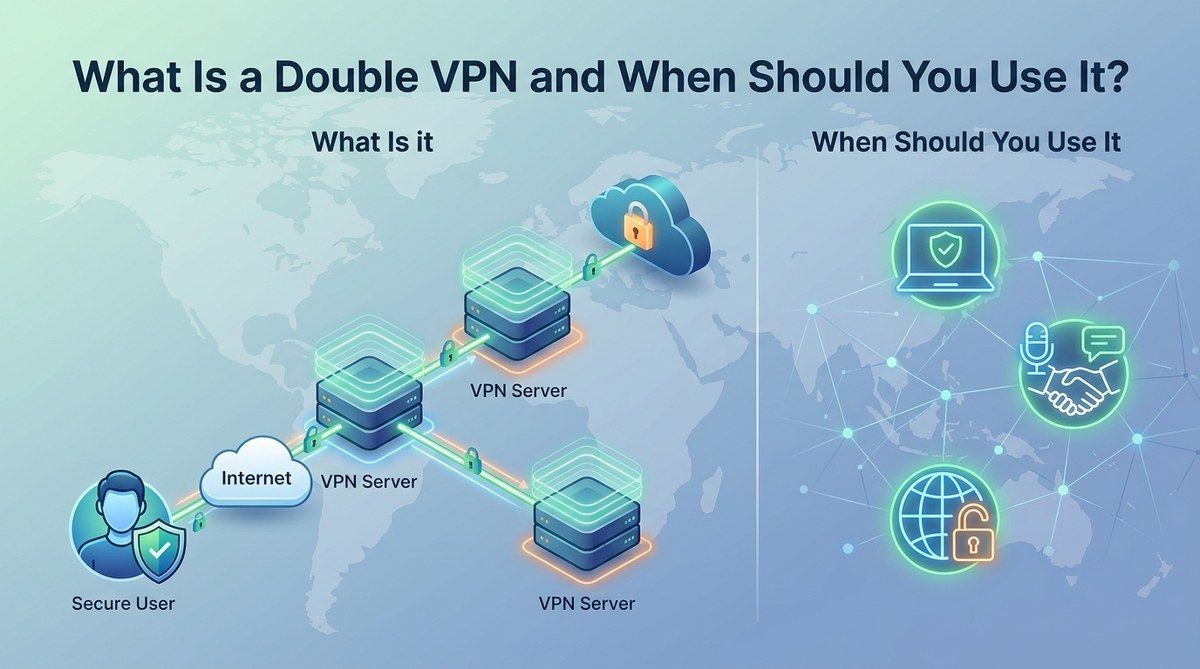
You have probably heard that a VPN encrypts your traffic and hides your IP address. That is true for a standard setup. But what if you want another layer of separation between you and the websites you visit? That is where a double VPN comes in. It sends your data through two separate VPN servers instead of one. Each server adds its own encryption, making it much harder for anyone to trace the traffic back to you. Think of it like a secure tunnel inside another secure tunnel. It is not something you need every day, but when you do need it, nothing else really compares.
A double VPN routes your internet traffic through two encrypted servers, creating a multi-hop chain that hides your original IP address from both your ISP and the destination website. This setup provides stronger anonymity than a single VPN, but it also reduces speed. Use it for sensitive tasks like journalism, activism, or protecting financial transactions.
How a Double VPN Actually Works
A standard VPN creates one encrypted tunnel between your device and a remote server. Your internet service provider can see that you are connected to a VPN, but it cannot see what you are doing inside that tunnel. The VPN server then decrypts your traffic and sends it to the final website.
A double VPN adds one more step. Your traffic goes through the first VPN server, gets encrypted, then travels to a second VPN server, where it gets encrypted again. The second server decrypts the outer layer and sends the data to its final destination. From the website’s perspective, the traffic appears to come from the second server. From your ISP’s perspective, the traffic appears to go to the first server. Neither party can see the full picture.
This setup is often called multi-hop or cascading VPN. Some providers offer it as a built-in feature, while others let you chain two VPNs manually.
When Should You Use a Double VPN?
You do not need a double VPN for casual browsing or streaming Netflix. The speed loss is noticeable, and the extra privacy is overkill for everyday tasks. But there are specific scenarios where the added protection is worth the trade-off.
Journalists and Activists in High-Risk Environments
If you report on sensitive topics or live in a country with heavy internet surveillance, a double VPN can make it much harder for authorities to track your online activity. Even if someone monitors the first VPN server, they cannot see where the traffic goes next. This is a common setup for journalists who need to communicate with sources safely.
Protecting Financial Transactions on Public Wi-Fi
Public Wi-Fi networks in coffee shops, airports, and hotels are notoriously unsafe. A single VPN protects you from casual snooping, but a double VPN adds a second layer of encryption. If an attacker somehow breaks the encryption on the first server, your data is still protected by the second layer.
Bypassing Advanced Censorship Systems
Some countries use deep packet inspection to detect and block VPN traffic. A double VPN can help because the outer encryption hides the fact that you are using a VPN at all. The traffic looks like normal encrypted data to the censors.
When You Want to Hide VPN Usage from Your ISP
Your ISP can see that you are connected to a VPN server. With a double VPN, they see the connection to the first server, but they cannot determine the final destination or the second server’s location. This adds an extra layer of privacy for users who want to keep their VPN usage completely hidden.
How to Set Up a Double VPN
The easiest way is to use a VPN provider that offers a multi-hop feature. Many premium providers include this as a toggle in their apps. Here is a general step-by-step process for setting up a double VPN manually if your provider does not offer it.
- Choose two VPN servers in different locations. Ideally, pick servers in countries with strong privacy laws. For example, you might choose a server in Switzerland as the first hop and a server in Iceland as the second hop.
- Connect to the first VPN server using your VPN client. Make sure the connection is stable and your IP address is hidden.
- Open a second VPN connection on top of the first one. You can do this by using a virtual machine or a router that allows multiple VPN tunnels. Some users set up a VPN on their router and then connect to a second VPN on their device.
- Test for IP and DNS leaks. Use an online leak test tool to confirm that your real IP address is not visible. If you see any leaks, disconnect and troubleshoot the setup.
- Verify the double hop. Check the IP address from the website’s perspective. It should show the location of the second VPN server, not the first one or your real location.
Common Mistakes to Avoid
Setting up a double VPN is more complex than a single connection. Here are some pitfalls to watch out for.
| Mistake | Why It Is Dangerous | How to Avoid It |
|---|---|---|
| Using servers in the same country | Reduces the anonymity benefit because both hops are in the same jurisdiction. | Choose servers in different countries with strong privacy protections. |
| Forgetting to enable a kill switch | If one VPN disconnects, your real IP address can leak. | Configure a kill switch on both VPN connections if possible. |
| Mixing VPN protocols incorrectly | Some protocol combinations cause connection drops or reduced security. | Use the same protocol for both hops, preferably WireGuard or OpenVPN. |
| Not testing for WebRTC leaks | WebRTC can expose your real IP address even through a VPN. | Disable WebRTC in your browser or use a privacy-focused browser like Brave. |
| Assuming double VPN means double speed | It always reduces speed because of the extra encryption and routing. | Only use double VPN when you truly need the extra privacy. |
Double VPN vs. Tor: Which Is Better for Anonymity?
Tor is a free network that routes your traffic through three volunteer-operated nodes. It offers strong anonymity, but it is noticeably slower than a double VPN. Tor also has a reputation for being used for illegal activity, which can draw unwanted attention in some countries.
A double VPN is faster than Tor because you control the servers. You can choose high-speed providers and optimize the connection. However, Tor is more decentralized, which makes it harder for any single entity to monitor the network.
Expert advice: If you need maximum anonymity for a one-time sensitive task, consider using Tor over a VPN. This setup, often called Tor over VPN, hides your Tor usage from your ISP and adds another layer of encryption. For regular use, a double VPN is more practical.
When a Single VPN Is Enough
A single VPN is sufficient for most privacy needs. It protects you from your ISP, hides your IP address from websites, and encrypts your data on public Wi-Fi. If you are not a journalist, activist, or someone under active surveillance, a standard VPN will serve you well.
You should also consider your threat model. If your main concern is preventing advertisers from tracking you, a single VPN combined with a privacy-focused browser is plenty. If you are worried about a government agency targeting you specifically, then a double VPN or Tor is worth the effort.
For a deeper look at how different privacy tools compare, check out our guide on SOCKS5 Proxy vs VPN to see which one fits your needs.
The Speed Trade-Off You Need to Know
Every extra hop adds latency. Your data has to travel to two different servers, be encrypted twice, and then be decrypted twice. This can slow down your connection by 50% or more depending on the server locations and your base internet speed.
If you need a double VPN for a specific task, plan for slower browsing. Avoid streaming video or downloading large files during that session. Use it only for the sensitive activity, then switch back to a single VPN for regular use.
A Simple Checklist for Using Double VPN
Before you rely on a double VPN for important work, run through this checklist.
- Confirm that both VPN servers are in privacy-friendly jurisdictions.
- Enable a kill switch on at least one of the connections.
- Test for IP, DNS, and WebRTC leaks using a reliable testing tool.
- Check the speed to make sure it is usable for your task.
- Verify that the second server’s IP address is the one visible to websites.
If any of these checks fail, do not proceed until you resolve the issue. A broken double VPN is no better than a single VPN, and it can give you a false sense of security.
Making the Right Choice for Your Privacy
A double VPN is a powerful tool, but it is not a magic bullet. It adds real protection when you are in a high-risk situation, but it comes with a cost in speed and complexity. For most people, a well-configured single VPN is more than enough.
If you are a traveler heading to a country with strict internet controls, a journalist working on a sensitive story, or someone who just wants the highest level of privacy for important transactions, a double VPN is worth setting up. For everything else, keep it simple.
Take a moment to think about your own privacy needs. Are you protecting against advertisers, your ISP, or a government? The answer will tell you whether a double VPN is the right choice for you. If you decide to go for it, test everything before you rely on it. Your privacy is worth that extra effort.