 By carl
You connect to a VPN. Your screen shows “Protected” or “Secure.” But what actually just happened to your internet traffic? Where is your data going, and who can see it now?
Most people turn on a VPN hoping for privacy, but the mechanics remain mysterious. Understanding what happens to your data when you use a VPN helps you make informed decisions about which services to trust and when protection actually matters.
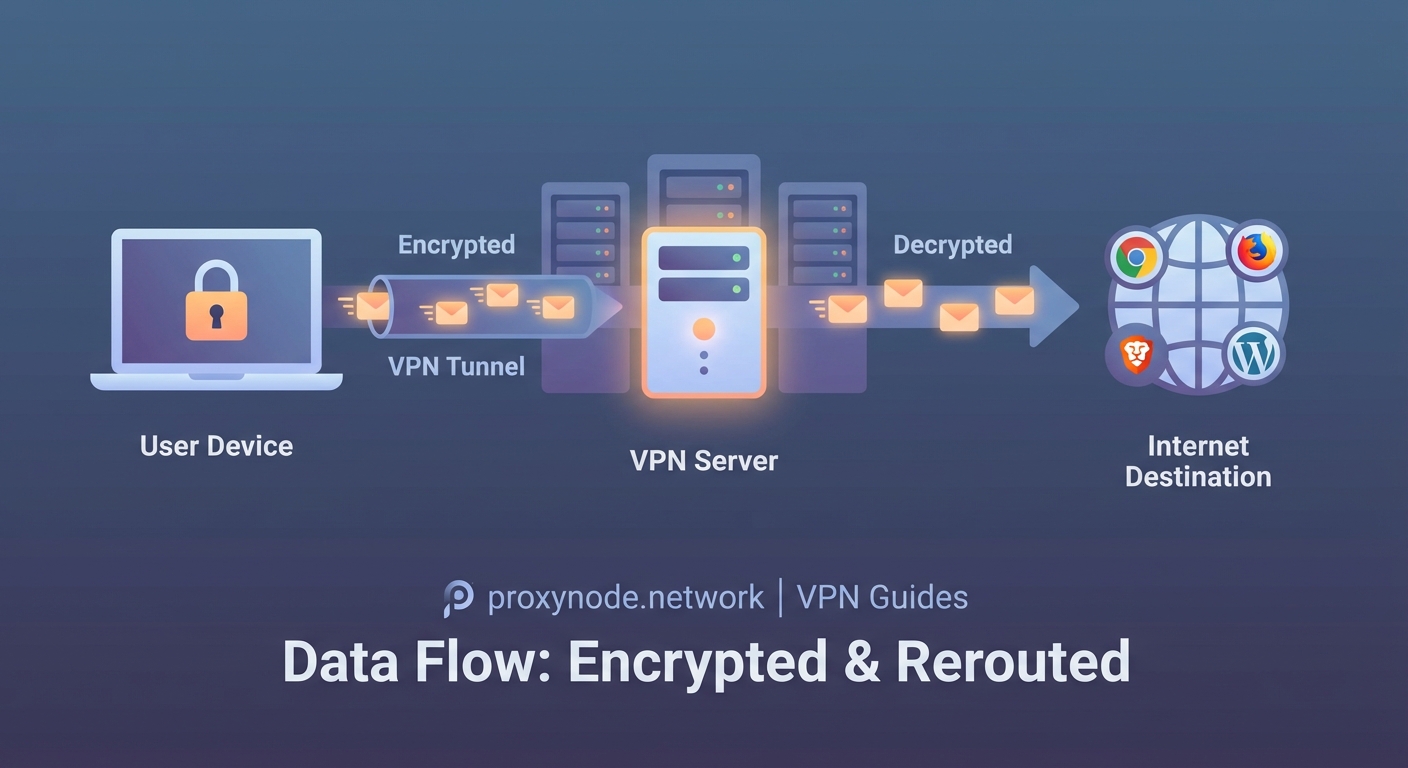
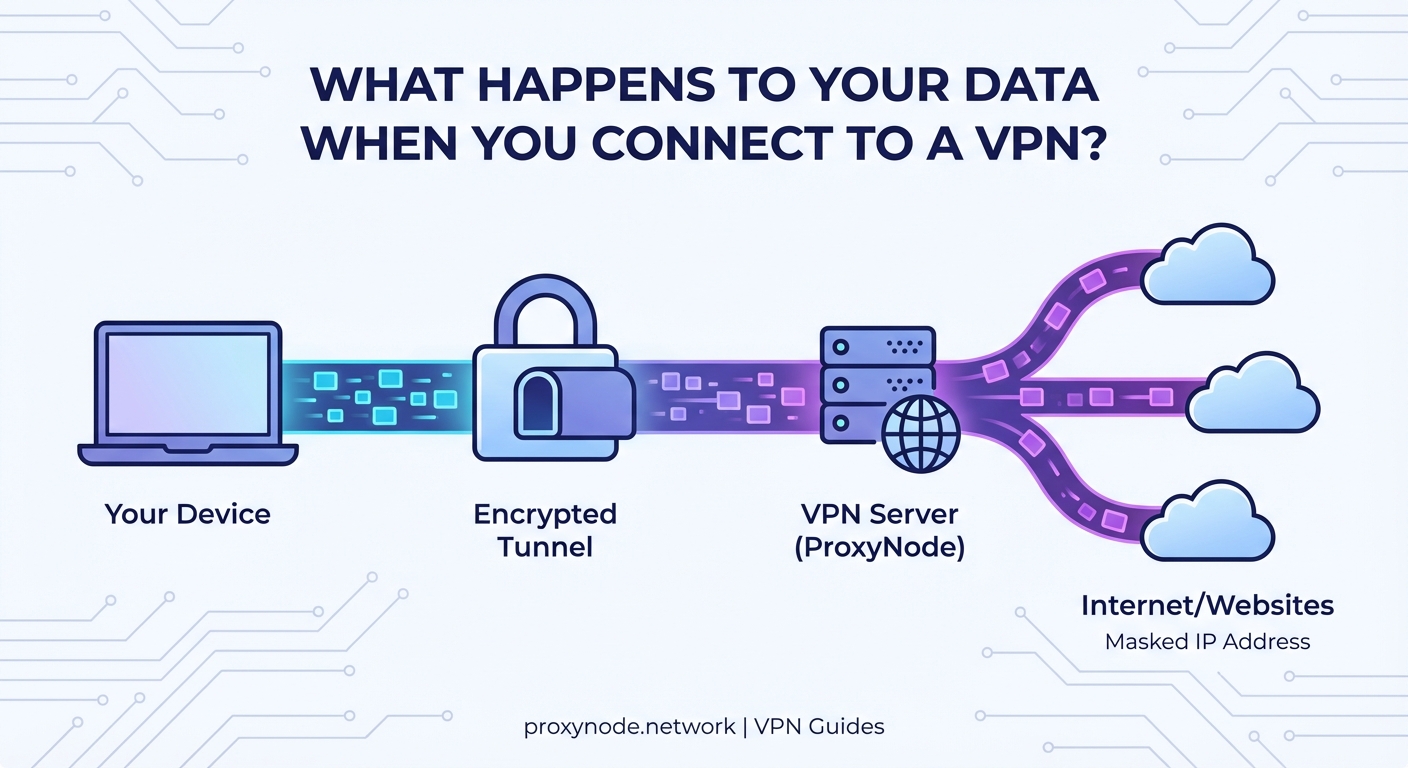
When you connect to a VPN, your data gets encrypted on your device, travels through a secure tunnel to the VPN server, then exits to reach its destination. Your ISP sees only encrypted traffic to the VPN server, not your actual browsing. The VPN provider, however, can see your real internet activity unless they follow strict no-logs policies. Your IP address changes to the VPN server’s location, masking your real location from websites.
The moment you connect
Your VPN app initiates a handshake with a remote server. This happens in seconds, but several critical changes occur.
First, your device creates an encrypted tunnel. Think of this tunnel as a protective pipe that wraps around your internet traffic. Nothing outside this pipe can see what’s flowing through it.
Your device and the VPN server exchange encryption keys. These keys are like matching locks that only you and the server possess. Even if someone intercepts your data mid-flight, they can’t decrypt it without these keys.
Your internet traffic now has a new route. Instead of going directly from your device to websites, everything flows through the VPN server first.
Your ISP loses visibility
Before using a VPN, your internet service provider sees everything. Every website you visit, every search you make, every video you stream. They can log this activity, sell it to advertisers, or hand it to authorities.
After connecting to a VPN, your ISP sees something very different.
They see that you’re connected to a VPN server. They can see the IP address of that server and the amount of data flowing back and forth. But they cannot see the contents of that data.
Your ISP knows you’re using a VPN, but they don’t know what you’re doing with it. They can’t tell if you’re watching videos, reading news, or checking email. The encryption makes all your traffic look like random noise.
This matters for several reasons:
- Your ISP can’t throttle specific services like streaming video
- They can’t build a profile of your browsing habits
- They can’t inject ads into your web pages
- They can’t sell your browsing history to data brokers
However, your ISP can still see metadata. They know when you’re online, how much data you’re using, and the duration of your sessions. They just can’t see what you’re actually doing.
The VPN server becomes your proxy
Your encrypted data arrives at the VPN server. Here’s where things get interesting.
The server decrypts your traffic. It needs to do this to send your requests to their actual destinations. If you’re visiting a website, the server needs to know which website to contact.
The server then forwards your request using its own IP address. To the outside world, the request appears to come from the VPN server, not from you.
When the website responds, the data flows back to the VPN server. The server encrypts it again and sends it back through the tunnel to your device.
This creates a crucial shift in who can see what:
| Observer | What They See Without VPN | What They See With VPN |
|---|---|---|
| Your ISP | All websites you visit | Only VPN server connection |
| Websites | Your real IP and location | VPN server IP and location |
| VPN Provider | Nothing | All websites you visit |
| Government/Hackers on local network | Unencrypted traffic | Encrypted tunnel only |
What your VPN provider actually sees
This is the uncomfortable truth many VPN marketing materials gloss over.
Your VPN provider can see everything your ISP used to see. They know which websites you visit, when you visit them, and how long you stay. They can see your real IP address and your actual location.
The only thing preventing them from logging and selling this information is their policy and jurisdiction.
Some providers keep detailed logs. Others claim to keep no logs at all. The difference matters enormously for your privacy.
A true no-logs VPN doesn’t record:
- Which websites you visit
- Your connection timestamps
- Your real IP address
- Your bandwidth usage per session
They might keep minimal data for operational purposes, like total bandwidth across all users or server load statistics. But they shouldn’t tie any activity to your identity.
Choose a VPN provider based in a privacy-friendly jurisdiction with a clear, audited no-logs policy. Your privacy depends entirely on their honesty and the laws they operate under.
The encryption layer explained
When people ask what happens to your data when you use a VPN, they’re often really asking about encryption.
Modern VPNs typically use AES-256 encryption. This is the same standard used by governments and military organizations. Breaking this encryption would take billions of years with current technology.
Here’s what gets encrypted:
- The websites you visit
- The data you send and receive
- Your DNS requests (which translate website names to IP addresses)
Here’s what doesn’t get encrypted:
- The fact that you’re using a VPN
- The amount of data you’re transferring
- The timing patterns of your traffic
Sophisticated observers can sometimes use timing and data volume patterns to make educated guesses about your activity. If you download exactly 700MB at the same time a popular TV show airs, someone might infer what you’re doing. But they can’t prove it or see the actual content.
DNS requests and potential leaks
Your device needs to translate website names into IP addresses. This process is called DNS resolution.
Without proper configuration, your DNS requests might bypass the VPN tunnel. This creates a leak where your ISP can see which websites you’re trying to visit, even though they can’t see the actual traffic.
Good VPN services route all DNS requests through their own servers. This ensures your ISP never sees which websites you’re accessing.
You can test for DNS leaks using simple online tools. If your DNS requests show your ISP’s servers instead of your VPN provider’s servers, you have a leak that undermines your privacy.
Your IP address changes
Every device on the internet has an IP address. It’s like a return address on a letter.
When you use a VPN, websites see the VPN server’s IP address instead of yours. This has several effects:
- Websites think you’re located wherever the VPN server is
- Your real location stays hidden
- You can access content restricted to certain regions
- Websites can’t build a profile tied to your real IP address
Your real IP address is only visible to your VPN provider. Everyone else sees the shared IP address of the VPN server.
Many users share the same VPN server IP address simultaneously. This creates a crowd to hide in. Websites can’t easily distinguish between different users coming from the same VPN server.
What websites and services detect
Websites aren’t blind to VPN usage. Many can detect that you’re connecting through a VPN.
They use several methods:
- Checking if your IP address belongs to a known VPN provider
- Analyzing connection patterns that differ from typical home internet
- Detecting mismatches between your IP location and other signals like language settings
Some services block VPN users entirely. Banking websites might flag VPN connections as suspicious. Streaming services often restrict content when they detect VPN usage.
This doesn’t mean your data is exposed. It just means the website knows you’re using a VPN and might treat you differently.
The return journey
When a website sends data back to you, it goes to the VPN server first. The server encrypts it and sends it through the tunnel to your device.
Your device decrypts the data and displays it normally. Your browser shows the website, your email client shows messages, your streaming app plays video.
This entire round trip adds some overhead. The encryption, decryption, and extra distance to the VPN server all take time. This is why VPNs typically slow down your internet connection somewhat.
The slowdown depends on:
- The VPN server’s distance from you
- The server’s current load
- Your VPN provider’s infrastructure quality
- The encryption protocol being used
Scenarios where VPNs protect you
Understanding what happens to your data helps you know when VPN protection actually matters.
Public WiFi networks: Without a VPN, anyone on the same network can potentially intercept your unencrypted traffic. The VPN tunnel prevents this completely.
ISP tracking: If you don’t want your internet provider building a profile of your online behavior, a VPN blocks their visibility into your browsing.
Geographic restrictions: When you need to access content only available in certain countries, the VPN makes you appear to be in that location.
Price discrimination: Some services charge different prices based on your location. A VPN can help you see pricing from different regions.
Scenarios where VPNs don’t protect you
VPNs aren’t magic shields. They don’t protect you from several common threats.
If you log into your real accounts, those services know who you are regardless of your IP address. Facebook knows you’re you when you log in, even through a VPN.
VPNs don’t protect against malware on your device. If your computer is infected, the malware can see everything before it gets encrypted.
Browser fingerprinting can still track you. Websites can identify you based on your browser configuration, installed fonts, screen resolution, and dozens of other factors that VPNs don’t change.
Cookies and tracking pixels follow you across the web. A VPN changes your IP address but doesn’t clear your cookies or block trackers.
Trust shifts, not eliminates
The fundamental reality of VPN usage is this: you’re shifting trust from your ISP to your VPN provider.
Your ISP can no longer see your browsing, but your VPN provider can. You’re betting that your VPN provider is more trustworthy, more private, or under better legal jurisdiction than your ISP.
This shift makes sense in many situations. Your ISP is often legally required to log your activity and comply with government requests. A good VPN provider in a privacy-friendly country faces fewer such requirements.
But the shift only helps if you choose wisely. A shady VPN provider could be worse than your ISP. They could log everything, sell your data, or even inject ads and malware.
Research your VPN provider thoroughly. Look for:
- Independent security audits
- Clear privacy policies
- Jurisdiction in privacy-friendly countries
- Transparent ownership
- No history of data breaches or logging scandals
Your data’s complete journey
Let’s walk through exactly what happens when you visit a website with a VPN active:
- You type a website address in your browser
- Your device encrypts this request inside the VPN tunnel
- The encrypted data travels to your VPN server
- The VPN server decrypts the request
- The server sends the request to the website using its own IP address
- The website responds to the VPN server
- The VPN server encrypts the response
- The encrypted response travels back through the tunnel
- Your device decrypts the response
- Your browser displays the website
At step 2, your ISP loses visibility. At step 5, the website loses visibility of your real identity. Only the VPN provider sees both ends of this connection.
Making VPN protection work for you
Now that you understand what happens to your data when you use a VPN, you can use this knowledge practically.
Choose your VPN provider as carefully as you’d choose a bank. They have access to sensitive information about your online life.
Use a VPN consistently on public networks. The protection matters most when others share your network.
Combine your VPN with other privacy tools. Use tracker blockers, clear cookies regularly, and consider privacy-focused browsers.
Remember that VPNs solve specific problems. They hide your activity from your ISP and mask your location from websites. They don’t make you anonymous or protect against all tracking methods.
Test your VPN regularly for leaks. Verify that your DNS requests aren’t bypassing the tunnel and that your real IP address stays hidden.
Your data flows through an encrypted tunnel, emerges at a remote server, and reaches its destination wearing a different IP address. Your ISP sees noise, websites see the VPN’s location, and your privacy depends on the provider you’ve chosen to trust. Understanding this flow helps you use VPNs effectively and know exactly what protection you’re actually getting.