 By carl
Yes, your ISP can see you’re using a proxy by analyzing your traffic patterns and destination IP addresses. They know you’re routing traffic through an intermediary server but cannot see the actual content of encrypted connections. Understanding what remains visible helps you choose the right privacy tools and configure them properly to minimize exposure.
You fire up a proxy to browse privately, assuming your internet service provider sees nothing. That assumption is wrong. Your ISP still sees plenty of information about your connection, even when you’re routing traffic through a proxy server.
The good news? What they see depends heavily on the type of proxy you use and how you configure it. Some proxies leave your browsing habits completely exposed. Others hide almost everything except the fact that you’re using a proxy at all.
Let’s break down exactly what your ISP can detect when you connect to a proxy, what stays hidden, and how to minimize the information they collect.
What Your ISP Sees by Default
Your internet service provider sits between your device and the rest of the internet. Every packet of data leaving your home passes through their infrastructure first. This gives them a front-row seat to your online activity.
Without any privacy tools, your ISP sees:
- Every website you visit
- How long you spend on each site
- The size of files you download
- Your DNS requests (which translate domain names to IP addresses)
- The timing and frequency of your connections
- Metadata about every packet you send
They don’t need to decrypt anything to build a detailed profile of your browsing habits. The metadata alone tells them most of what they want to know.
How Proxies Change What’s Visible
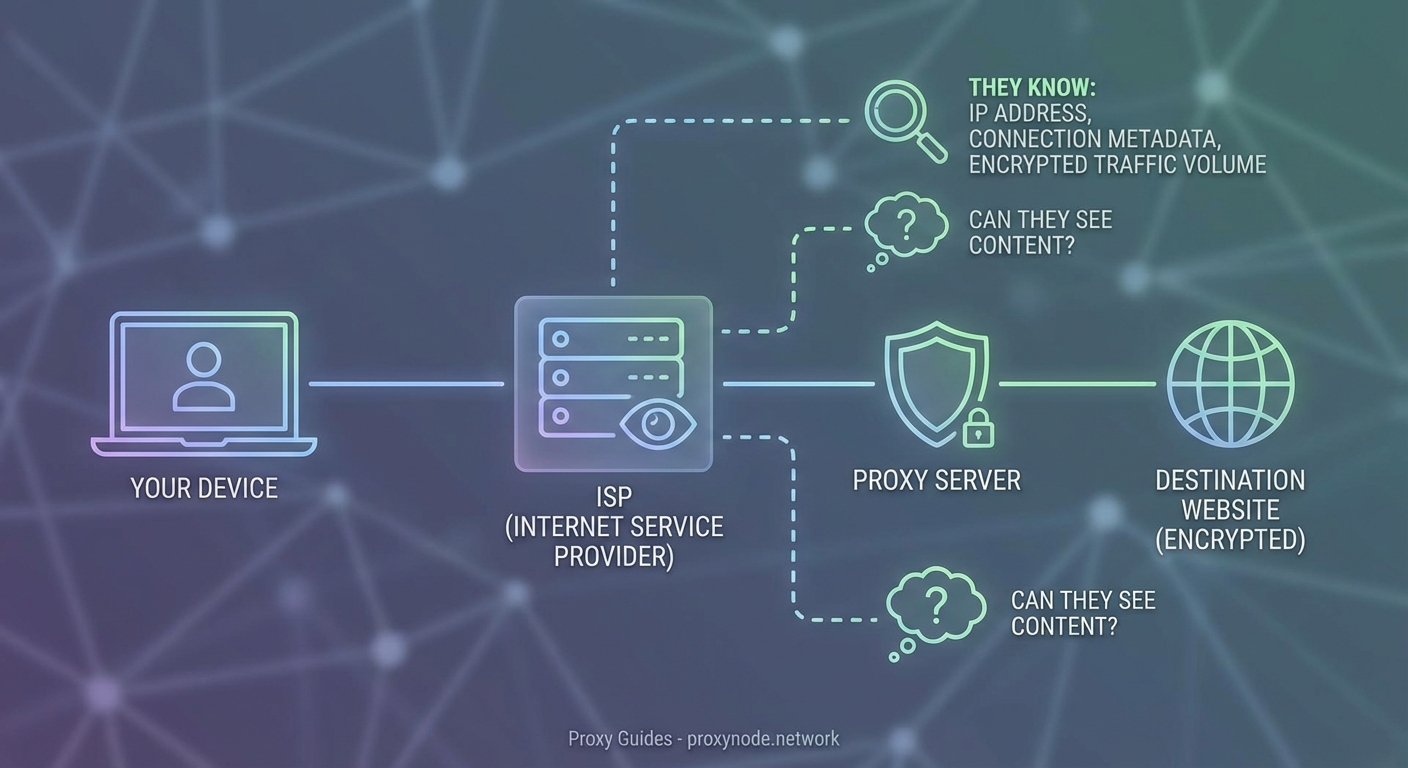
When you connect through a proxy, you’re routing your traffic through an intermediary server. Instead of connecting directly to websites, you connect to the proxy, which then connects to websites on your behalf.
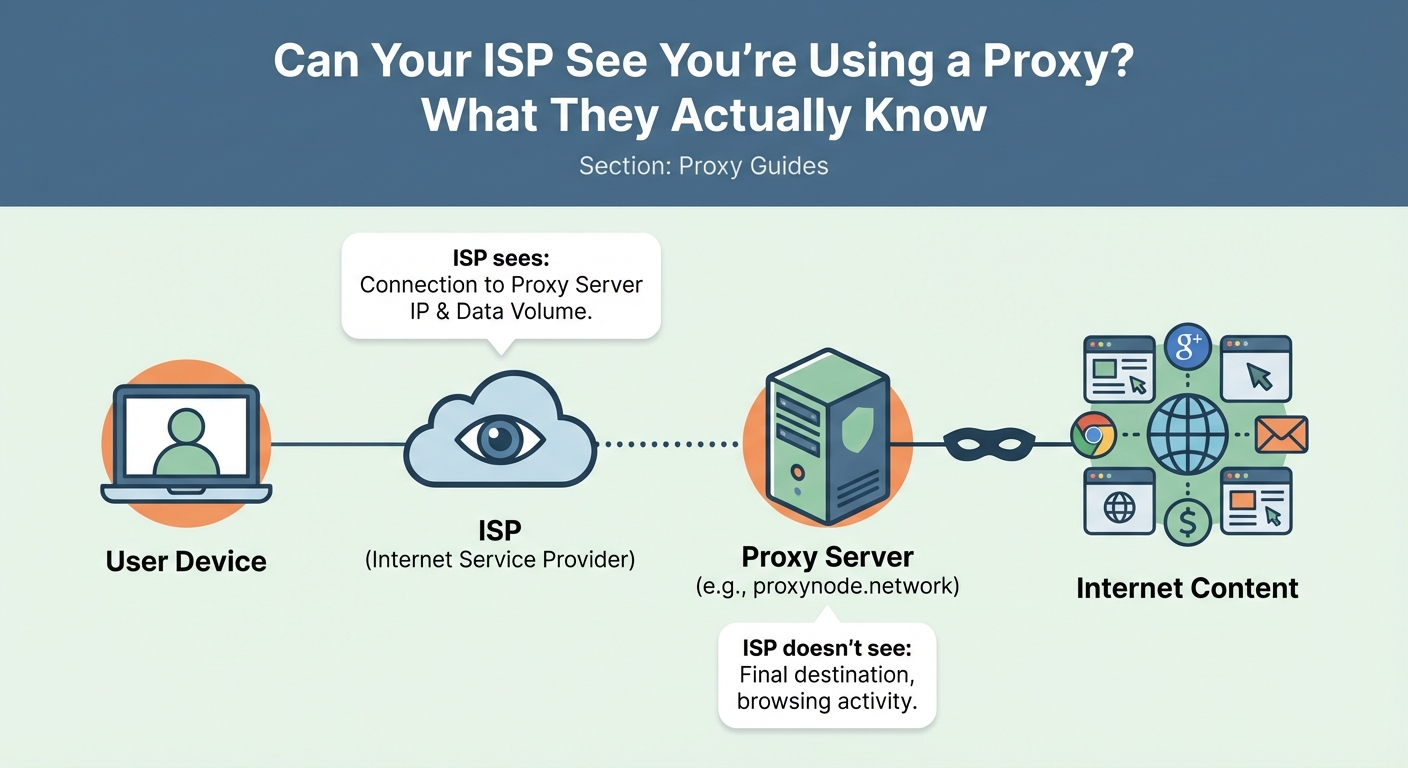
This changes what your ISP can see. Instead of viewing your connection to Facebook or Netflix, they see a connection to the proxy server’s IP address. The destination websites see the proxy’s IP address, not yours.
But here’s the catch: your ISP still sees that initial connection to the proxy.
They know:
- The IP address of the proxy server you’re using
- When you connected to it
- How much data you’re sending and receiving
- The duration of your session
- Traffic patterns that suggest what you’re doing
They just can’t see the final destination of your traffic after it leaves the proxy.
The Type of Proxy Makes a Huge Difference
Not all proxies hide information equally. The protocol matters more than most people realize.
| Proxy Type | ISP Visibility | Content Protection | DNS Protection |
|---|---|---|---|
| HTTP Proxy | High | None | No |
| HTTPS Proxy | Medium | Yes | No |
| SOCKS5 Proxy | Medium | Depends | Depends |
| VPN | Low | Yes | Yes |
HTTP Proxies Leave Everything Exposed
Standard HTTP proxies provide almost no privacy from your ISP. They can see every website you visit because HTTP traffic isn’t encrypted. The proxy simply forwards your requests without protecting them.
Your ISP sees the proxy connection and all the unencrypted traffic passing through it. This offers zero privacy benefit for sensitive browsing.
HTTPS Proxies Protect Content
When you use an HTTPS proxy, your traffic gets encrypted between your device and the proxy server. Your ISP sees the connection to the proxy but cannot read the content of your requests.
They still see:
- Traffic volume
- Connection timing
- The proxy server’s IP address
They cannot see:
- Which websites you’re visiting
- What you’re downloading
- The content of your communications
This provides meaningful privacy, but it’s not perfect. Understanding HTTP vs HTTPS vs SOCKS proxies helps you choose the right tool for your needs.
SOCKS5 Proxies Offer Flexibility
SOCKS5 proxies work at a lower network level than HTTP proxies. They can handle any type of traffic, not just web browsing. Whether they encrypt your traffic depends on the implementation.
A properly configured SOCKS5 proxy with encryption provides similar privacy to an HTTPS proxy. Without encryption, it offers no protection from ISP monitoring.
DNS Requests Reveal Your Destinations
Here’s a privacy leak most people miss: DNS requests. Before your browser can connect to a website, it needs to translate the domain name into an IP address. This translation happens through DNS servers.
If you’re using your ISP’s default DNS servers, they see every domain name you look up, even when using a proxy. You might route your traffic through a proxy, but your DNS requests go straight to your ISP.
The solution is simple: configure your device or router to use third-party DNS servers. Options include:
- Cloudflare (1.1.1.1)
- Google Public DNS (8.8.8.8)
- Quad9 (9.9.9.9)
Better yet, use encrypted DNS protocols like DNS-over-HTTPS (DoH) or DNS-over-TLS (DoT). These encrypt your DNS requests so your ISP cannot read them. Learn more about why DNS leaks are silently destroying your privacy.
Traffic Analysis Reveals Usage Patterns
Even when your ISP cannot see the content of your traffic, they can analyze patterns. Traffic analysis is surprisingly effective at identifying what you’re doing online.
They can detect:
- Video streaming based on sustained high bandwidth
- Video calls based on bidirectional traffic patterns
- File downloads based on large data transfers
- Regular browsing based on small, frequent requests
Encrypted traffic still has a signature. Netflix traffic looks different from browsing Wikipedia, even when both are encrypted. The timing, packet sizes, and connection patterns give away the type of activity.
Some advanced techniques can even identify specific websites based solely on traffic patterns. Researchers have demonstrated this with both proxies and VPNs.
Can Your ISP Block Proxy Usage?
Yes, and some do. Your ISP can identify proxy traffic and throttle or block it if they choose.
Common detection methods include:
- Blacklisting known proxy server IP addresses
- Analyzing traffic patterns that indicate proxy usage
- Inspecting packet headers for proxy signatures
- Monitoring DNS requests to proxy provider domains
Some countries actively block proxy and VPN usage. Internet service providers in those regions use deep packet inspection (DPI) to identify and block proxy traffic.
In most countries, using a proxy is legal, and ISPs don’t actively block it. But they can, and they know you’re using one.
How to Minimize ISP Visibility
If you want to reduce what your ISP sees when using a proxy, follow these steps:
-
Use an encrypted proxy protocol. HTTPS proxies or SOCKS5 with encryption prevent your ISP from reading your traffic content.
-
Configure encrypted DNS. Use DNS-over-HTTPS or DNS-over-TLS to prevent your ISP from seeing your DNS requests.
-
Consider using a VPN instead. VPNs encrypt all your traffic and typically include DNS protection by default. Check if a VPN or proxy is better for your needs.
-
Avoid free proxies. Free proxy services often lack proper encryption and may even log your traffic themselves.
-
Test for leaks regularly. Use online tools to verify your proxy isn’t leaking your real IP address or DNS requests.
-
Use HTTPS websites. Even with a proxy, visiting HTTP sites exposes your activity. Always use HTTPS when available.
The most common mistake people make is assuming their proxy hides everything. It doesn’t. Your ISP always sees that you’re using a proxy and can often infer what you’re doing based on traffic patterns alone. Real privacy requires encryption at every layer.
The Difference Between Proxies and VPNs
People often confuse proxies and VPNs. Both route your traffic through intermediary servers, but VPNs provide significantly more privacy from your ISP.
A VPN encrypts all traffic leaving your device, not just web browsing. It typically includes:
- Full traffic encryption
- DNS leak protection
- Kill switches that block traffic if the VPN disconnects
- Protection for all apps, not just your browser
Your ISP can still see you’re connected to a VPN server, but they see even less than with a proxy. Learn more about what your ISP can track when using a VPN.
That said, proxies have advantages in specific situations. They’re often faster and work better for tasks like accessing geo-restricted content without encrypting all your traffic. Understanding when proxies beat VPNs helps you choose the right tool.
Common Mistakes That Expose Your Activity
Even with a properly configured proxy, certain mistakes can expose your browsing activity to your ISP.
Using unencrypted proxies. HTTP proxies provide no privacy benefit. Your ISP sees everything.
Forgetting about DNS. Your DNS requests bypass the proxy unless you specifically configure DNS protection.
Mixing proxy and non-proxy traffic. If some apps use the proxy while others don’t, your ISP sees both types of traffic and can correlate them.
Using proxies from untrusted providers. The proxy provider can see everything your ISP can’t. Choose carefully. Consider what happens to your data with free proxy servers.
Not testing for leaks. IP leaks and DNS leaks expose your real identity. Regular testing catches configuration problems.
Many of these issues also affect VPN users. Avoiding common VPN mistakes improves your privacy regardless of which tool you choose.
What About Residential vs Datacenter Proxies?
The type of proxy server also affects ISP visibility. Residential proxies use IP addresses assigned to real homes by internet service providers. Datacenter proxies use IP addresses from hosting companies.
Your ISP can more easily identify datacenter proxies because those IP ranges are publicly known. Residential proxies blend in with normal traffic better, making them harder to detect as proxies.
However, both types still reveal that you’re routing traffic through an intermediary. The encryption level matters more than the proxy type for privacy. Learn more about residential vs datacenter proxies.
Testing Your Proxy Configuration
After setting up a proxy, verify it’s working correctly and not leaking information.
-
Check your IP address. Visit an IP checking website to confirm it shows the proxy’s IP, not yours.
-
Test for DNS leaks. Use a DNS leak test tool to verify your DNS requests go through the proxy or third-party DNS servers.
-
Verify encryption. Use browser developer tools to confirm HTTPS connections are working properly.
-
Monitor for disconnections. Some proxies disconnect without warning, exposing your real IP. Testing if your protection is working applies to both VPNs and proxies.
Regular testing catches configuration problems before they compromise your privacy.
What Your ISP Can Actually Do With This Information
Knowing your ISP can detect proxy usage raises an important question: what do they do with that information?
In most cases, nothing. Internet service providers in democratic countries typically don’t care if you use a proxy. They might log the connection for network management purposes, but they won’t take action against you.
Some ISPs in some countries:
- Throttle proxy traffic to manage bandwidth
- Block known proxy servers to enforce content restrictions
- Report proxy usage to government authorities
- Sell anonymized traffic data to advertisers
The legal and regulatory environment in your country determines what your ISP can do. In places with strong privacy laws, ISPs face limits on data collection and retention. In countries without such protections, they have much more freedom.
Protecting Your Privacy Beyond Proxies
Proxies are one tool in a larger privacy toolkit. Complete privacy requires multiple layers of protection.
Consider:
- Using Tor for maximum anonymity (though it’s much slower)
- Enabling HTTPS Everywhere in your browser
- Using privacy-focused browsers like Firefox or Brave
- Installing ad blockers that prevent tracking
- Clearing cookies and browser data regularly
- Using different email addresses for different services
No single tool provides perfect privacy. Combining multiple privacy measures creates overlapping layers of protection that compensate for each individual tool’s weaknesses.
Choosing the Right Privacy Tool for Your Needs
The best privacy tool depends on what you’re trying to accomplish.
Use a proxy when:
- You need to access geo-restricted content
- Speed matters more than maximum privacy
- You only need to protect browser traffic
- You’re doing low-risk browsing
Use a VPN when:
- You need to protect all traffic from all apps
- You’re on public WiFi
- You want comprehensive privacy protection
- You can tolerate slightly slower speeds
Use Tor when:
- You need maximum anonymity
- Speed doesn’t matter
- You’re accessing sensitive information
- You face serious privacy threats
Deciding between free and paid services also affects your privacy level. Free services often compromise privacy to cover costs.
Making Informed Privacy Decisions
Your ISP can see you’re using a proxy. They can’t see what you’re doing through an encrypted proxy, but they know you’re routing traffic through an intermediary server.
This isn’t necessarily a problem. Using a proxy is legal in most places, and ISPs generally don’t care. What matters is understanding the limitations so you can make informed decisions about your privacy tools.
Choose encrypted proxy protocols, configure DNS protection, test for leaks regularly, and understand that no tool provides perfect invisibility. Your ISP will always see some metadata about your connections. The goal is minimizing what they see and ensuring they can’t access the content of your communications.
Privacy is about managing risk, not achieving perfection. Know what your tools protect, know what they don’t, and layer multiple protections when you need stronger privacy guarantees.